


Computer vision in Amazon Go powers the checkout-free retail experience by tracking shoppers, products, and shelf interactions in real time without cashiers or manual scanning. This blog breaks down the complete technology stack behind Amazon Go, including AI models, sensor fusion, edge computing, infrastructure costs, and the real-world challenges businesses must solve to build scalable cashierless stores.
Introduction
You have probably seen the footage where a shopper walks into a store, picks up a few items, and exits without visiting a cashier, a scanner, or any checkout station. A digital receipt arrives on their phone minutes later, and the purchase charges to their account automatically.
If you run a retail business or lead product at one, that experience triggers something specific. You do not just find it impressive. You want to know how it works, and then you ask whether your business can build the same thing.
Computer vision in Amazon Go is the technical engine that makes that experience possible. The system is not a single clever trick. It is a precisely engineered stack of cameras, AI models, edge hardware, and sensor data working in exact coordination at retail speed.
This guide breaks all of it down. You will see the full architecture, the AI models involved, the real development costs, and the step-by-step roadmap for building a comparable solution for your retail or enterprise environment.
What Exactly Is Amazon Go and Why Does Its Technology Matter?
Amazon Go is a cashierless retail store. Shoppers enter using the Amazon app, pick up items, and exit without any checkout interaction. The system tracks every product interaction in real time and charges the shopper’s linked account automatically at exit.
Amazon opened its first Go store in Seattle in January 2018. Since that launch, Amazon has expanded to dozens of locations in the United States and licensed the underlying “Just Walk Out” technology to third-party retailers across multiple countries.
That licensing decision matters for every retailer watching closely. Amazon now sells this technology to airports, sports stadiums, hospital campuses, and grocery chains. The system operates well beyond Amazon’s own retail stores today.

The “Just Walk Out” Experience Explained
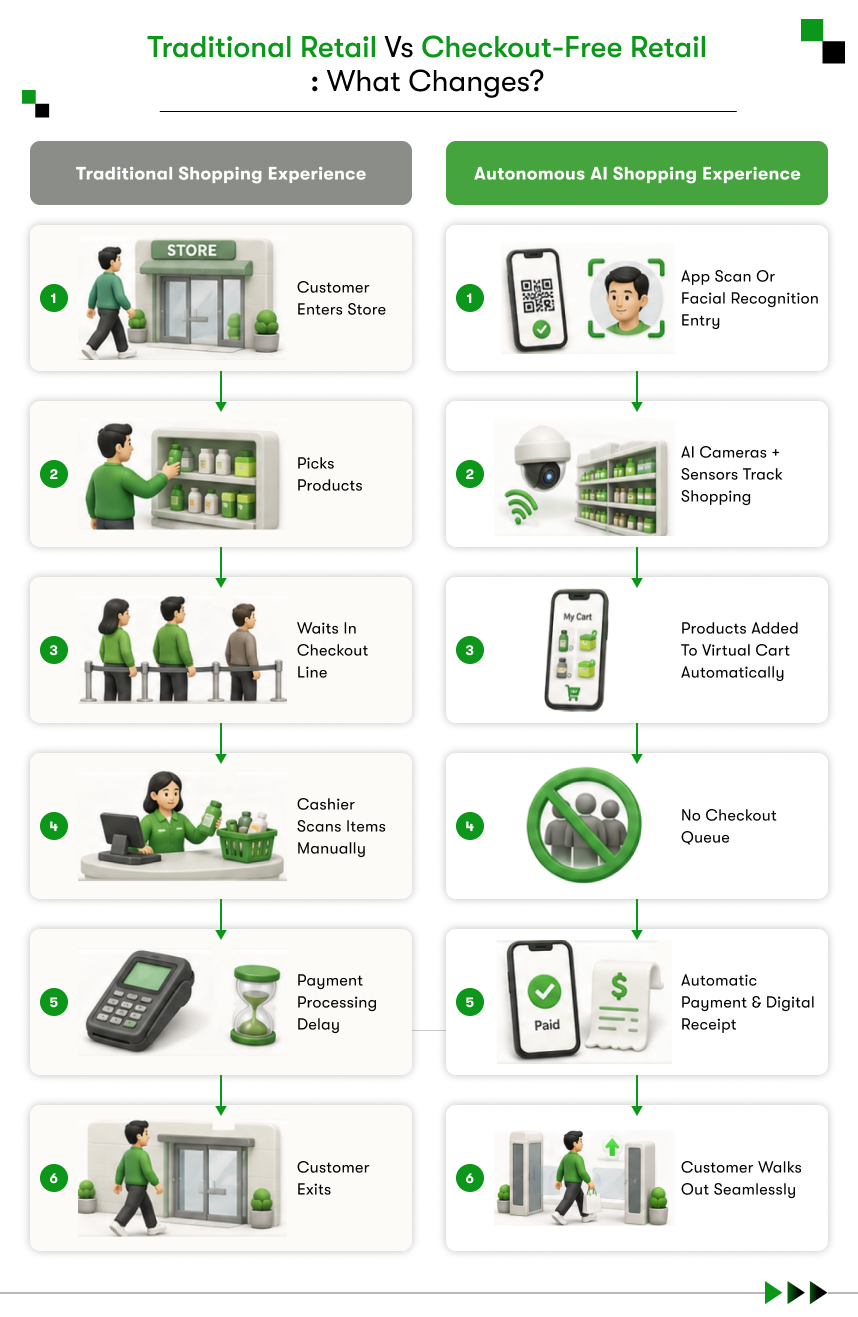
A shopper opens the Amazon Go app and scans a QR code at the entry gate. The gate unlocks and the shopper enters the store. From that moment, cameras and sensors track every product interaction across the full store layout. When the shopper walks out, the system compiles the virtual cart, delivers a digital receipt, and charges the linked account automatically.
The entire process from entry to exit requires zero manual scanning and zero cashier interaction. The shopper’s virtual cart builds and updates in real time from the first step inside to the last step out.
What Business Problem Amazon Go Was Built to Solve
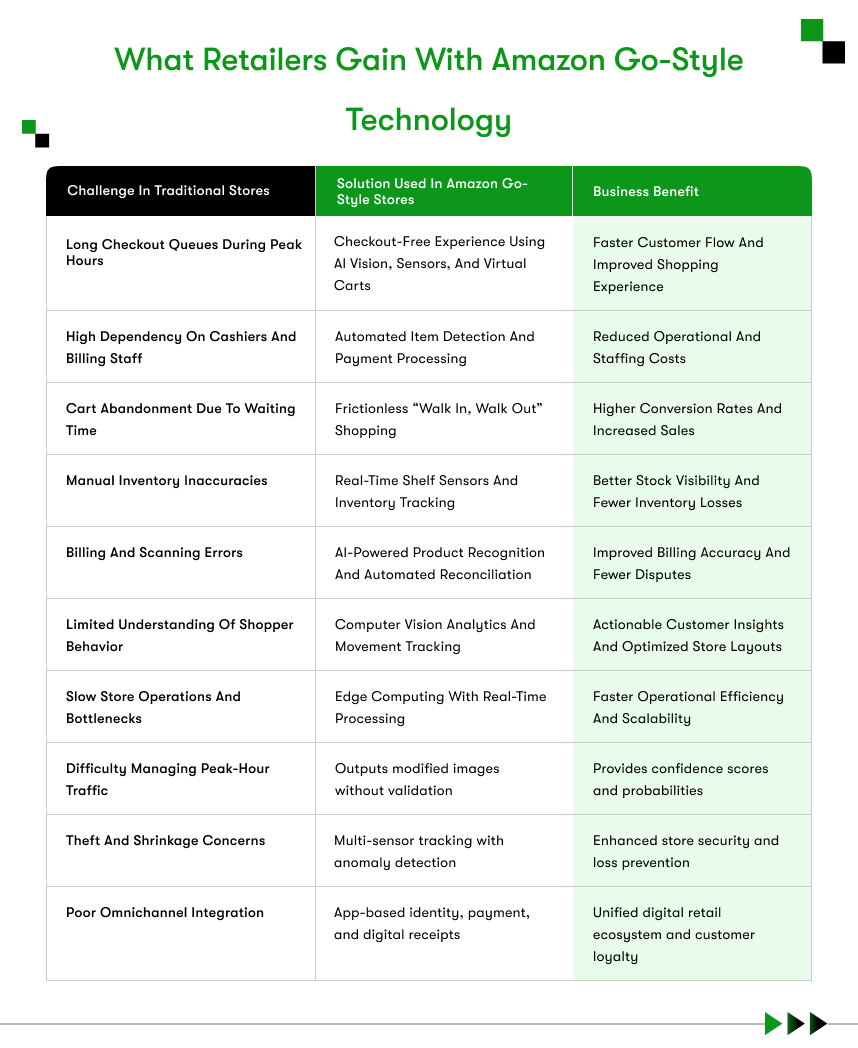
Amazon Go addresses four persistent retail problems that operators have struggled with for decades:
- Queue abandonment: Research shows that a significant share of shoppers leave stores without purchasing because checkout lines run too long. Amazon Go removes the checkout line from the experience entirely.
- Labor costs: Checkout staffing represents one of the highest recurring operational expenses in grocery and convenience retail. A cashierless system substantially reduces that cost.
- Shrinkage: Traditional stores lose between 1.4% and 2% of annual revenue to theft and inventory errors. A computer vision system creates a verifiable record of every product interaction in the store.
- Inventory blind spots: Manual stock counts create restocking delays and missed sales. Shelf sensors in Amazon Go feed live inventory data directly into the store management system without any manual input.

Where Amazon Go Stands Today
Amazon currently operates Amazon Go and Amazon Fresh locations using Just Walk Out technology across the United States. The company has licensed the system to retail partners including Hudson News airport locations, Fenway Park concessions, and multiple international grocery operators.
That licensing activity sends a clear signal to the market. The technology that Amazon once kept as a private competitive advantage now works as a commercial service available to other retailers. Businesses well outside of Amazon’s scale now have a documented path toward comparable capability.
How Does Amazon Go Use Computer Vision? The Core Technical Architecture
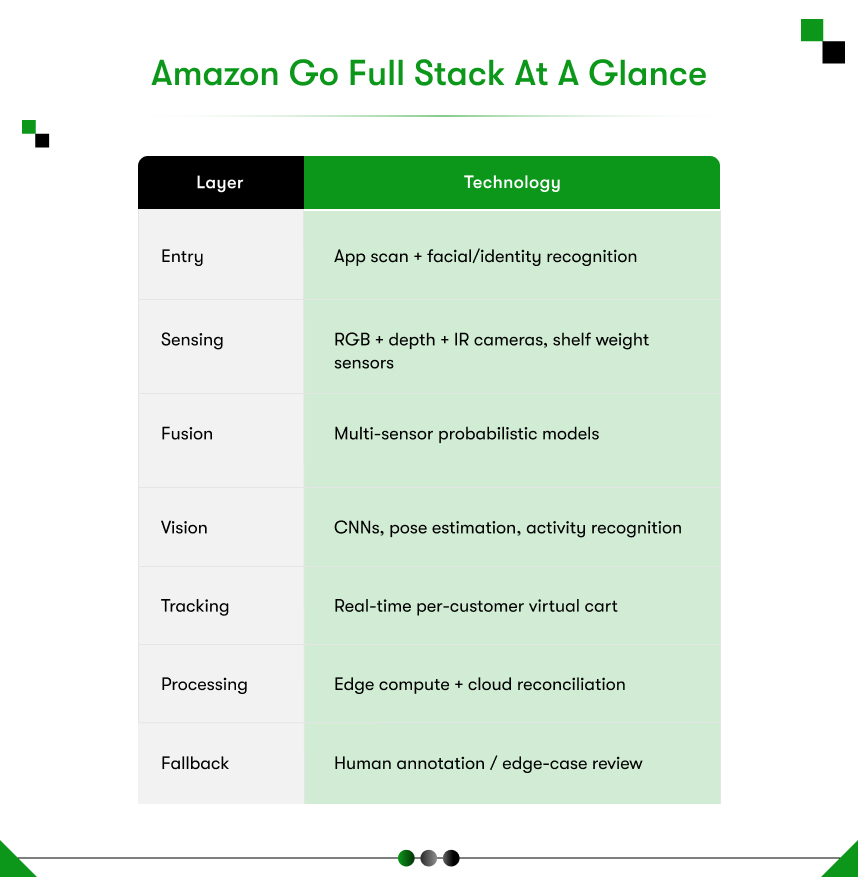
Amazon Go uses a ceiling-mounted camera network, multiple real-time computer vision models, and shelf weight sensors working in parallel. The system detects product interactions, assigns each one to a specific shopper, and updates a virtual cart continuously throughout the entire store visit.
For businesses exploring Computer Vision in Retail, Amazon Go represents the most complete publicly documented production deployment of cashierless retail technology available to study today.
The technical architecture operates across four distinct layers.
The Camera Grid: Density, Placement, and Coverage Logic
Amazon Go stores use hundreds of cameras mounted in overlapping grids across the ceiling. A typical location measuring around 1,800 square feet uses an estimated 100 to 150 cameras.
The overlapping placement is a deliberate engineering decision. No shelf zone falls outside at least two simultaneous camera angles. When one camera loses sight of a hand interaction due to body position or shelf angle, an adjacent camera captures the same event from a different vantage point.
Camera specifications for this type of deployment include:
- Resolution of 1080p or higher for accurate product-level detection
- Wide-angle lenses to maximize spatial coverage per camera unit
- Low-light capability for consistent performance across varying in-store lighting conditions
- Frame rates of 30fps or higher to support smooth motion analysis and action classification
Computer Vision Models Doing the Heavy Lifting
Each camera feeds live video into computer vision models that run in real time. These models perform four tasks simultaneously on every active frame:
- Person detection: The system identifies each shopper as a distinct tracked entity immediately upon entry.
- Product recognition: Models identify specific SKUs on shelves, including products with nearly identical packaging.
- Hand and arm tracking: The system detects when a hand reaches toward a shelf and which product that hand contacts.
- Action classification: The model determines whether the shopper removed the item or placed it back on the shelf.
All four tasks run in parallel on every camera feed, every second the store operates.
Sensor Fusion: Where Computer Vision Meets Weight Sensors
Computer vision handles the visual analysis layer. Weight sensors handle the physical confirmation layer.
Each shelf section in an Amazon Go store contains embedded pressure sensors. When a shopper removes a product, the shelf registers a weight change. The system cross-references that weight change with the corresponding computer vision event to confirm which product moved and which shopper moved it.
Sensor fusion substantially reduces false positives in the virtual cart. Computer vision alone struggles under conditions like crowded shelves, nearly identical packaging, or partial occlusion from a shopper’s body position. The weight sensor provides a physical ground-truth validator for each visual event the camera system detects.
Real-Time Edge Processing vs. Cloud Inference
Amazon Go processes the majority of video inference at the edge, on hardware installed inside the store rather than on a remote cloud server.
The reason is latency. Sending hundreds of simultaneous camera feeds to a cloud server for processing introduces delays that make real-time tracking impossible. Edge compute nodes installed in the store perform inference locally, within milliseconds of each camera frame capture.
Cloud infrastructure handles secondary functions: payment processing, receipt generation, inventory record updates, and model performance monitoring. The split between edge and cloud is a deliberate architectural choice that every comparable build must replicate from the start.
The Computer Vision Models and Algorithms Behind Amazon Go
Amazon Go runs object detection, action recognition, and multi-object tracking models simultaneously across hundreds of camera feeds. The system combines outputs from all three model types to build and maintain an accurate virtual cart for every active shopper in the store.
If you are planning a comparable build, this Computer Vision Development Guide explains how each model type contributes to the full system and what development decisions arise at each stage.
Object Detection and Product Recognition at Scale
Object detection models identify specific products within each camera frame. For Amazon Go, this means distinguishing between hundreds of distinct SKUs, many of which look nearly identical on a shelf at arm’s length.
Two flavors of the same chip brand may differ only in label color. The detection model must distinguish between those two products reliably, in real time, under variable lighting and partial shelf occlusion. Achieving that level of reliability requires:
- A labeled training dataset with thousands of annotated examples per SKU
- Models fine-tuned on the actual store inventory, not on generic public object detection datasets
- Confidence thresholds calibrated to minimize both missed pick-ups and incorrect charges
- Ongoing model retraining as new products enter the store’s active inventory
Action Recognition and Hand Interaction Detection
Object detection identifies what sits on the shelf. Action recognition determines what happened to each product.
Amazon Go uses skeletal keypoint models to track hand, wrist, and arm position across multiple consecutive video frames. The system analyzes this skeletal trajectory to classify each product interaction with one of three outcomes:
- A hand approaching the shelf followed by a shelf weight change registers as a pick-up event.
- A hand approaching the shelf with no weight change registers as a browsing event and produces no cart update.
- A hand approaching the shelf, pausing, and reversing without a weight change registers as a put-back event.
Temporal modeling, which analyzes the sequence of frames rather than any single static frame, is what makes accurate action classification possible.
Multi-Object Tracking Across Camera Feeds
The system must maintain a persistent identity for each shopper across the entire store, across hundreds of camera zones, and for the full duration of every visit.
Amazon Go achieves this without facial recognition. The tracking system uses body shape, clothing color, height proportions, and gait patterns to maintain persistent shopper identities as each person moves between camera coverage zones.
Each shopper receives a unique tracking ID at the moment of entry gate scan. That ID persists through every zone transition until the shopper exits. Every product interaction throughout the visit attaches to that ID and compiles into the final virtual cart.
Handling Edge Cases: Occlusion, Crowding, and Ambiguous Actions
Edge cases are where most computer vision systems fail in production environments. Amazon Go handles several high-frequency real-world scenarios with built-in system responses:
| Edge Case | Challenge | System Response |
| Occlusion | A shopper’s body blocks the camera view of their hand | Adjacent camera angles resolve the same interaction |
| Crowding | Multiple shoppers reach the same shelf simultaneously | Per-person tracking IDs maintain individual separation |
| Wrong-shelf put-back | An item lands in an incorrect shelf location | The weight sensor flags the discrepancy for reconciliation |
| Similar SKUs | Near-identical packaging exists between two different products | A fine-tuned detection model applies calibrated confidence thresholds |
| Lighting variation | In-store lighting shifts across the operating day | Low-light cameras and normalized inference pipelines maintain accuracy |
Data, Privacy, and the Ethical Architecture of Amazon Go
Amazon Go collects movement data and product interaction events during each store visit. The system does not use facial recognition to identify shoppers inside the store. Shopper identification happens once at the entry gate through an Amazon account linked to the app scan.
Businesses exploring people analytics applications for retail environments must understand the distinction between behavioral tracking and biometric identification before scoping any computer vision deployment.
What Data Amazon Go Actually Collects
Amazon Go captures the following data categories during each shopping session:
- Entry timestamp and account identifier recorded via the app QR scan at the entry gate
- Movement path through the store using positional tracking, not biometric identification
- Shelf interaction events including products picked up or returned with precise timestamps
- Time each shopper spends in individual store zones
- Virtual cart contents and final purchase total at exit
Amazon has publicly confirmed that the system does not build or store biometric face templates. After each session concludes, raw video footage deletes from the system. Only structured transaction and interaction data remains in the store’s operational records.
GDPR, CCPA, and Compliance Considerations for Retail CV Deployments
Businesses building computer vision retail systems must comply with different regulatory frameworks depending on the geography of each deployment:
| Regulation | Region | Key Requirement |
| GDPR | United Kingdom, European Union | Explicit consent, right to erasure, strict data minimization |
| CCPA | California, United States | Consumer opt-out rights, mandatory disclosure of data categories collected |
| UAE Personal Data Protection Law | United Arab Emirates | Localized data storage, documented consent obligations |
Any computer vision retail deployment must include clear in-store signage disclosing camera use, a publicly accessible privacy policy, and a documented data retention schedule specifying how long footage and interaction logs are stored before deletion.
Anonymization Techniques in Large-Scale People Tracking
The most privacy-compliant approach to in-store computer vision tracking uses body skeleton overlays rather than retaining raw video footage.
Skeleton-based tracking converts each shopper into a stick-figure skeletal model within the system’s working memory. The raw video frame undergoes processing, the skeletal data extracts from that frame, and the original footage deletes before any data reaches storage.
This architecture supports full movement and interaction tracking without retaining identifiable visual footage of individual shoppers. Businesses building similar systems under GDPR or CCPA constraints should treat skeleton anonymization as the default design choice from the beginning, not an optional privacy feature added after launch.
What Does It Cost to Build a Computer Vision Solution Like Amazon Go?
A pilot-scale deployment for a single small retail store costs between $500,000 and $1.5 million, covering hardware and custom software development. A full production system for a larger retail space typically exceeds $3 million. Ongoing annual operational costs run between $100,000 and $300,000 per store location.
Engaging an experienced Computer Vision Development Company gives businesses an accurate cost breakdown before committing to any specific build scope.
Infrastructure Costs: Cameras, Edge Hardware, and Network
| Component | Estimated Cost Range |
| IP cameras per unit at 1080p or higher | $200 – $800 |
| Camera installation labor per store | $15,000 – $50,000 |
| Edge compute nodes with GPU acceleration per store | $20,000 – $80,000 |
| Local network infrastructure per store | $10,000 – $30,000 |
| Shelf weight sensors per individual shelf section | $500 – $2,000 |
For a 2,000 square foot store with 120 cameras and 200 shelf sections, hardware infrastructure alone runs between $200,000 and $500,000 before software development begins.
Software and Model Development Costs
| Development Phase | Estimated Cost Range |
| Data collection and annotation pipeline | $30,000 – $150,000 |
| Object detection model development | $50,000 – $200,000 |
| Action recognition model development | $40,000 – $180,000 |
| Multi-object tracking system | $50,000 – $200,000 |
| System integration and API development | $30,000 – $100,000 |
| QA, testing, and pilot deployment | $20,000 – $80,000 |
Total software development for a production-grade pilot system falls between $500,000 and $1,500,000 depending on team experience and total SKU count.
Ongoing Operational Costs: Maintenance, Retraining, and Scaling
Most businesses underestimate post-launch operational costs significantly. These recurring expenses include:
- Model retraining: Adding new products requires updated training data and fresh retraining cycles. Each major retraining cycle costs between $5,000 and $20,000.
- Hardware maintenance: Camera and edge compute hardware requires maintenance contracts and periodic unit replacement. Budget between 10% and 15% of total hardware cost annually.
- Cloud infrastructure: Storage, monitoring dashboards, and analytics infrastructure adds between $2,000 and $10,000 per store per month.
- Software support: Ongoing development support and security patching runs between $5,000 and $25,000 per month depending on team size and contract scope.
Build vs. Buy vs. Partner: Which Path Makes Sense?
| Approach | Best Fit | Key Trade-Off |
| Build in-house | Enterprises with existing AI engineering teams | Maximum control at the highest cost and longest timeline |
| License an existing solution | Businesses prioritizing speed to market | Faster deployment with limited customization and ongoing licensing fees |
| Partner with a specialized firm | Businesses without deep AI infrastructure | Balanced cost, faster delivery, and access to proven expertise |
Businesses without an in-house AI engineering team get the best combination of cost, quality, and timeline by partnering with a specialized development firm.
How to Build a Computer Vision Solution Like Amazon Go: The Development Roadmap
Building a computer vision retail system follows five core phases: discovery and scoping, data collection and annotation, model training and validation, system integration and edge deployment, and post-launch monitoring. Each phase produces defined deliverables that directly determine the quality of the phase that follows.
Before starting this process, businesses should Hire Computer Vision Developers with verifiable production deployment experience, not teams whose work exists only in research papers or controlled demo environments.
Step 1: Define Scope, Use Case, and Store Layout Requirements
Start with a detailed scoping document that answers these foundational questions before any development begins:
- What is the total square footage of the target store location?
- How many distinct SKUs does the store currently carry?
- What is the expected peak shopper footfall per hour?
- What existing systems, including POS, ERP, and inventory management, must integrate with the new solution?
- What latency is acceptable between a product interaction and the corresponding virtual cart update?
This phase takes between four and eight weeks. The output is a technical requirements document that guides every subsequent development phase and prevents costly rework downstream.
Step 2: Data Collection and Annotation Strategy
Model quality depends directly on the quality and volume of training data. A realistic annotation pipeline for a store with 500 SKUs produces between 50,000 and 200,000 labeled video frames before model training begins.
Businesses typically source training data through three channels working in parallel:
- Real-world footage collection at the actual store under different lighting conditions, crowd densities, and time-of-day scenarios
- Labeled annotation work covering frame-by-frame classification of each SKU across thousands of individual video frames
- Synthetic data generation using 3D rendering tools to simulate rare edge cases that real-world footage cannot capture at sufficient volume
A well-structured synthetic data pipeline cuts real-world annotation requirements by 40% to 60%. The model maintains full accuracy on validation benchmarks with this approach.
Step 3: Model Selection, Training, and Validation
The development team selects base architectures suited to each model type within the system:
| Model Type | Common Base Architecture Options |
| Object detection | YOLOv8, Detectron2, EfficientDet |
| Pose and keypoint estimation | MediaPipe, OpenPose, ViTPose |
| Multi-object tracking | DeepSORT, ByteTrack, StrongSORT |
| Action recognition | SlowFast Networks, Video Transformers |
Fine-tuning these established architectures on store-specific data delivers faster results and significantly lower cost than training entirely from scratch. Validation measures model accuracy against a held-out test set that deliberately includes the most common real-world edge cases from the target store environment.
Step 4: System Integration, Edge Deployment, and Testing
Trained models move from the development environment to edge hardware installed inside the store. This phase includes:
- Configuring edge compute nodes to receive and process all camera feeds in real time
- Integrating the virtual cart output with the store’s existing POS and payment infrastructure
- Running latency tests under simulated peak traffic with multiple simultaneous active shoppers
- Stress testing across all shelf zones to identify performance degradation under crowded conditions
The engineering benchmark for virtual cart updates sits under 500 milliseconds from the moment of product interaction to cart registration. Any latency above that threshold creates reconciliation errors at scale.
Step 5: Launch, Monitor, and Iterate
Post-launch operations follow a structured continuous improvement cycle:
- Live dashboards track model accuracy rates, cart error rates, and system latency across all active camera zones in real time.
- Customer feedback and manual receipt reviews surface systematic model errors for targeted correction cycles.
- Scheduled retraining addresses model drift caused by seasonal product additions, packaging redesigns, or new SKU introductions.
- Model updates deploy to edge hardware via over-the-air pipelines that avoid any store downtime during the rollout process.

Key Challenges in Replicating Amazon Go-Style Computer Vision
Replicating Amazon Go’s technology presents four major engineering challenges: training data scarcity, real-time latency requirements, multi-location scalability, and integration with legacy retail systems. Each challenge requires deliberate architectural decisions before development begins, not after problems surface in production.
Training Data Scarcity for Niche Retail Environments
Most retailers cannot independently source the volume of labeled training data that Amazon assembled over years of internal development.
Practical projects address the data gap through three combined approaches:
- Controlled real-world collection during a structured pilot phase at a single store location
- Synthetic data generation using 3D rendering tools to simulate product interactions at scale for edge cases that real footage cannot easily cover
- Transfer learning applied from publicly pre-trained model checkpoints to reduce the labeled data requirement per SKU substantially
This combination makes the data challenge manageable even for retailers who start the project with zero existing computer vision training assets.
Latency Requirements in Real-Time Tracking Systems
Running inference on 100 or more simultaneous camera feeds requires edge compute hardware that most retail operations have never provisioned or managed before.
The challenge compounds because multiple models execute in parallel on every frame. Object detection, pose estimation, and multi-object tracking all run simultaneously. A bottleneck in any single model delays the entire virtual cart update pipeline for every active shopper at that moment.
Practical solutions to this latency challenge include:
- Model quantization to reduce inference computation requirements per frame without significant accuracy loss
- Dedicated GPU or NPU hardware on each edge compute node rather than relying on standard CPU processing
- An asynchronous pipeline architecture to prevent one slower model from blocking downstream processes across the full system
Scalability Across Multiple Store Locations
A model trained for one store layout, product assortment, and lighting environment will not perform equally well in a second store without deliberate adaptation. Businesses scaling to multiple locations require three things:
- Store-specific model fine-tuning using transfer learning from the original trained model checkpoint
- Centralized model management infrastructure that pushes coordinated updates across all active locations simultaneously
- Standardized camera placement specifications across all stores to reduce environment variability between locations
Integration with Legacy Retail Systems
Most retailers operate POS systems and ERP platforms that predate modern AI infrastructure entirely. Connecting a real-time computer vision stack to these systems requires:
- Custom API development for platforms that lack modern REST or GraphQL integration endpoints
- Data format translation layers between the computer vision system’s output structure and the POS system’s expected input format
- Thorough reconciliation testing to verify that virtual cart data consistently matches POS transaction records without systematic errors
Integration work is consistently the most underestimated phase of the entire build. Teams that scope it incorrectly at the beginning face the most expensive corrections at the end.
Industries Beyond Grocery That Can Use This Technology
Amazon Go-style computer vision applies to any environment where product selection, checkout friction, or real-time inventory tracking creates measurable operational or revenue problems. The underlying technology works across environments, not just grocery stores.
Relevant industries with strong fit for this approach include:
- Airport retail: Travelers operate under tight time constraints. Eliminating checkout friction directly increases average transaction value in airport convenience locations where every minute counts.
- Stadium and event venues: High-volume, short-window sales environments benefit significantly from cashierless checkout during peak event periods when concession lines cost revenue with every passing minute.
- Corporate cafeterias: Cashierless employee meal programs reduce queue time during lunch rushes and automate billing reconciliation without manual cashier involvement.
- Hospital retail: Pharmacies and gift shops inside hospital environments serve customers under personal stress. Frictionless checkout measurably improves the experience for those shoppers.
- Convenience stores: High-traffic, small-footprint locations with fast shopper cycles represent the most natural fit for this technology outside of grocery.
- Warehouse and fulfillment centers: The same computer vision architecture tracks inventory and verifies pick accuracy without requiring manual scanning at any stage of the fulfillment process.
- University campuses: Campus dining facilities, bookstores, and student convenience stores serve high-volume populations with very limited time between scheduled commitments.
- Luxury retail: Cashierless checkout in premium store environments elevates the experience for high-value customers without sacrificing product security or real-time inventory accuracy.


Conclusion
Amazon Go did not build its cashierless system quickly or cheaply. Amazon invested years assembling engineering talent, constructing training datasets from scratch, and refining the hardware infrastructure that makes Just Walk Out technology perform under real-world retail conditions.
The full architecture behind computer vision in Amazon Go, combined with sensor fusion and real-time edge inference, now serves as a documented reference point for any retailer willing to build toward it. The models exist. The hardware is commercially accessible. Specialized engineering teams know how to build these systems for production retail environments that operate under genuine operational pressure.
The distance between Amazon’s system and what a well-resourced retailer can build today is smaller than most founders expect. The question is not whether this technology is achievable outside of Amazon. The question is whether the team a business chooses to build with has actually delivered it in production before.
Kody Technolab is a computer vision development company that builds production-grade AI systems for businesses in retail, logistics, healthcare, and enterprise environments across the USA, UK, and UAE. The team has helped businesses scope, develop, and deploy computer vision solutions that perform under real-world conditions, not just in controlled demonstrations.
If you are exploring a cashierless retail system, an in-store analytics platform, or any computer vision application for your business, bring your use case directly to Kody Technolab’s team. Bring your constraints, your existing infrastructure, and your timeline. You will get a technical conversation built entirely around your specific project requirements.
Frequently Asked Questions
How does Amazon Go use computer vision to track items?
Amazon Go uses ceiling-mounted cameras and object detection models to identify specific products on shelves. Hand interaction models classify each pick-up and put-back event as it happens. Shelf weight sensors physically validate every visual interaction the camera system detects. The system combines all three data sources continuously to maintain an accurate virtual cart for every active shopper throughout the full store visit.
Does Amazon Go use facial recognition?
Amazon Go does not use facial recognition to identify shoppers inside the store. Shopper identification happens exactly once, at the entry gate, through a QR code scan linked to the shopper’s Amazon account. Inside the store, the tracking system uses body shape, clothing color, and gait patterns to maintain persistent identities across camera zones. No biometric face data enters the system after the entry scan.
How much does it cost to build a system like Amazon Go?
A pilot-scale deployment for a single small store costs between $500,000 and $1.5 million including hardware and custom software development. A full production system for a larger retail space typically exceeds $3 million. Annual operational costs add between $100,000 and $300,000 per active store location, covering model retraining, hardware maintenance, and cloud infrastructure.
Can a mid-size retailer realistically build something like Amazon Go?
A mid-size retailer can build a comparable system with the right development partner and a structured phased approach. Starting with a single pilot store, a defined SKU set, and a planned expansion roadmap makes the build financially and technically achievable for businesses well outside of enterprise scale. The pilot phase reveals the real cost and complexity before the business commits to a full rollout.
How long does it take to develop a computer vision retail solution?
A pilot deployment for a single store takes between 12 and 18 months from initial scoping to go-live. Discovery and scoping runs 4 to 8 weeks. Data collection and model training runs 12 to 16 weeks. System integration and testing runs 8 to 12 weeks. Pilot launch and performance stabilization runs 4 to 6 weeks. SKU count, annotation pipeline throughput, and POS infrastructure quality are the variables that compress or extend this timeline most significantly.
What hardware is required to run Amazon Go-style computer vision?
The minimum hardware stack for a pilot store includes high-resolution IP cameras (100 or more for a 2,000 square foot location), on-site edge compute nodes with GPU or NPU acceleration, shelf weight sensors across every active product section, and a high-bandwidth local network connecting all cameras to the edge hardware. Cloud infrastructure handles payment processing, analytics dashboards, and remote model monitoring.