


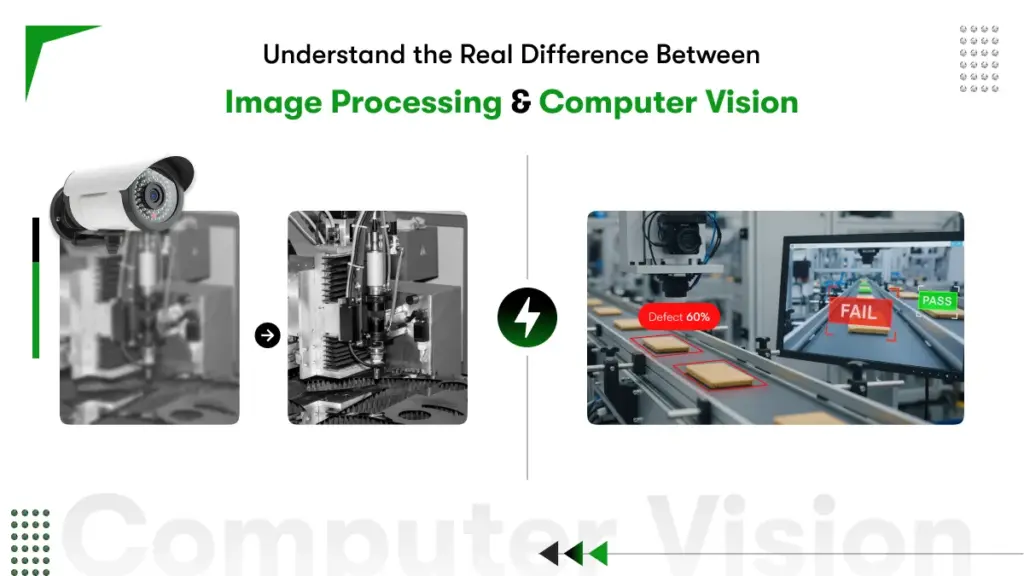
Quick Summary: Computer vision vs image processing are two terms that sound alike but solve completely different problems. Pick the wrong one and your AI project stalls before it starts, and when you pick the right one, it gives you better ROI. This guide breaks down exactly what each technology does, where each delivers real business value, how the two work together, and which one your use case actually needs. Read this before hiring a developer or signing any development contract.
Businesses lose thousands of dollars building the wrong AI system. The root cause of most failures? Mixing up computer vision vs image processing, because it creates ambiguity.
Both fields work with visual data. Both surface in the same technical conversations. But one manipulates pixels, whereas the other extracts meaning from pixels. Getting the two confused leads to wrong hires, wrong builds, and expensive restarts.
The confusion between computer vision vs image processing is one of the most common mistakes business leaders make before investing in automation. And that confusion often leads to choosing the wrong solution, paying for capabilities you do not need, or missing the ones you do.
The global computer vision market is projected to grow to $72.66B by 2031. So understanding the real difference between image processing and computer vision saves budget, prevents wasted sprints, and helps businesses invest in the right technology from the start.
This guide breaks down what each technology does, how image processing vs computer vision differ in real factory and business environments, and how to decide which one your operations need in 2026.
What Does Image Processing Actually Do for Your Business?
Image processing improves the quality of a raw image so humans or machines can work with it accurately. It operates at the pixel level, adjusting brightness, removing noise, correcting distortions, and sharpening edges. The output is always a better version of the original image, not a decision made from it.
Think of image processing as the preparation step. Before a radiologist reads an X-ray, the image gets enhanced for clarity. Before a barcode scanner reads a label on a fast-moving conveyor, the image gets corrected for motion blur.
Image processing works with rule-based, deterministic algorithms. Feed in the same image, and you will get the same enhanced output every time. There is no learning happening. There is no judgment. A Gaussian filter blurs. A Sobel operator finds edges. A histogram equalizer boosts contrast. These are mathematical operations with predictable results.
Core Characteristics of Image Processing
⦁ Operates at the pixel level using mathematical transformations
⦁ Outputs a processed or enhanced image, not a decision
⦁ Rule-based and deterministic, the same input always gives the same output
⦁ Requires minimal training data or machine learning infrastructure
⦁ Runs efficiently on standard CPUs without GPU acceleration
Common Applications
⦁ Medical imaging: enhancing X-rays, MRI scans, and CT images for diagnostic accuracy
⦁ Photo editing software: noise reduction, color correction, and sharpening
⦁ Satellite imagery: removing atmospheric interference and correcting lens distortion
⦁ Document scanning: perspective correction and contrast adjustment for OCR
⦁ Industrial cameras: stabilizing footage before a quality inspection system reads it
Industries Using Image Processing:
| Industry | Image Processing Use Case |
| Healthcare | MRI and CT scan enhancement for clearer doctor review |
| Manufacturing | Surface defect image capture for human inspection |
| Satellite Imaging | Land cover classification and environmental monitoring |
| Photography | Color correction, noise removal, filter application |
| Document Scanning | OCR preprocessing and text clarity improvement |
Real example: A pharmaceutical manufacturer uses histogram equalization to correct uneven lighting on bottle label images before a label verification system checks each label. Without that image processing step, the verification system produces 12% more false rejects.
What Does Computer Vision Actually Do for Your Business?
Computer vision enables machines to understand what is in a visual scene and take intelligent action based on that understanding. Where image processing prepares and cleans visual data, computer vision interprets it detecting objects, classifying defects, tracking movement, and triggering real-world responses.
Computer vision sits inside the AI and machine learning domain. Models are trained on large labeled datasets, so the system learns to recognize patterns it has never been explicitly programmed to find. A deep learning model trained on thousands of welding images can spot micro-cracks invisible to human inspectors, even under variable lighting conditions.
The output of a computer vision system is always a decision or an insight, not a better image. ‘This part passes quality check.’ ‘This person is not wearing PPE.’ ‘This shelf section is out of stock.’ ‘Vehicle 4B is occupying a no-parking zone.’ These are actions, not pixels.
Core Characteristics of Computer Vision
- Learns from labeled data using CNNs, transformers, or other deep learning models
- Outputs decisions, classifications, object detections, and actionable alerts
- Handles variable conditions: changing light, angles, occlusions, and scene complexity
- Performance improves as more training data is added over time
- Typically requires GPU hardware or accelerated edge devices for real-time inference
Common Applications
- Autonomous vehicles: real-time detection of pedestrians, road signs, and obstacles
- Manufacturing quality control: automated defect detection at production line speed
- Facial recognition: identity verification for access control and security systems
- Retail analytics: customer behavior analysis, shelf availability tracking, and checkout automation
- Predictive maintenance: identifying early equipment wear patterns using camera feeds
- Agriculture: crop health monitoring from drone imagery
Most real-world computer vision applications and examples run on deep learning models. Convolutional Neural Networks (CNNs) handle the bulk of image classification and detection tasks
Computer Vision Across Industries:
| Industry | Computer Vision Use Case |
| Automotive | Lane detection, obstacle recognition, self-driving navigation |
| Healthcare | AI-assisted diagnosis from medical scans |
| Retail | Cashierless checkout, shelf inventory monitoring |
| Security | Real-time threat detection and facial recognition |
| Agriculture | Crop disease detection from aerial drone footage |
| Logistics | Package sorting, barcode scanning, dimension measurement |
Real example: An automotive supplier deploys a YOLO-based computer vision model on their production line. The model inspects 120 parts per minute, flags surface defects as small as 0.1mm, and automatically triggers rejection before a faulty part reaches assembly. Detection accuracy: 99.2%. Previous manual inspection rate: 85%.
For a full technical walkthrough, read Kody’s How Computer Vision Works guide.
Computer Vision vs Image Processing: Head-to-Head Comparison
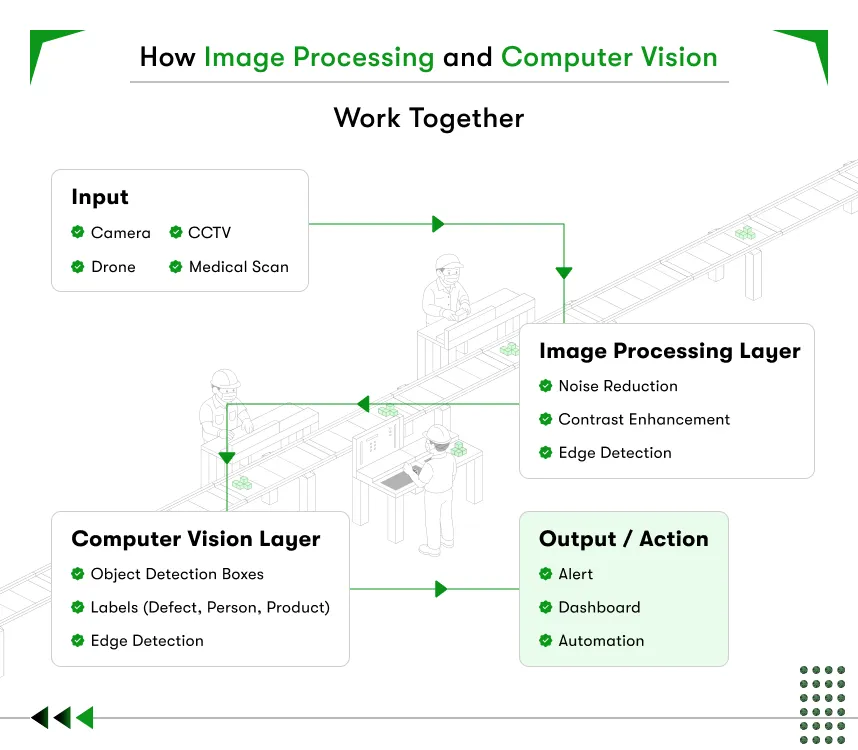
Now that you are clear about what is image processing and compter vision let’s understand the difference between the 2 concept. Computer vision and image processing work closely together. Image processing acts as a preprocessing step inside a computer vision pipeline. Before a computer vision model analyzes an image, image processing cleans and standardizes the visual input for better model accuracy. The two technologies work as a team rather than as rivals.

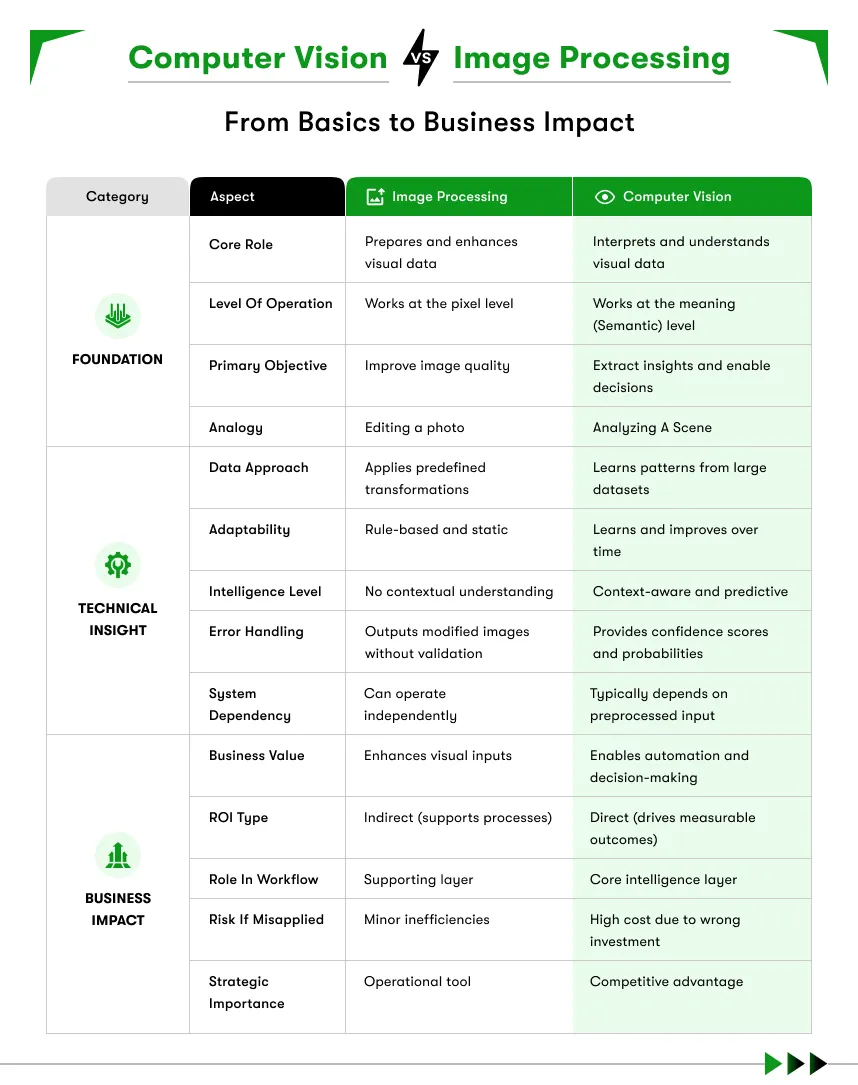
The workflow looks like this:
Raw Image → Image Processing (clean, enhance, normalize) → Computer Vision Model (analyze, decide, act)
Consider a self-driving car camera capturing footage on a foggy road. Image processing removes fog distortion and sharpens object edges. The computer vision model then detects pedestrians, lane markings, and traffic signals accurately.
Without the image processing step, the computer vision model receives dirty data. Dirty data leads to inaccurate detections. Inaccurate detections lead to dangerous outputs in safety-critical systems.
But a business does not always need both. Some use cases require only image processing. Others require the full computer vision pipeline.
Knowing where your requirement sits determines the right development investment from day one.
Here’s a clean differentiation table of computer vision vs image processing:
| Comparison Parameter | Image Processing | Computer Vision |
| Primary Goal | Improve or modify image quality | Understand and interpret image content |
| Input | Image or video | Image, video, or sensor data |
| Output | Processed or modified image | Decision, label, alert, or automated action |
| Intelligence Required | No machine learning needed | Requires ML or deep learning |
| System Complexity | Low to medium | Medium to high |
| Human Involvement | Human reviews the final output | Minimal to zero human review needed |
| Processing Speed | Fast and deterministic | Varies by model architecture |
| Primary Tools | OpenCV (basic), MATLAB, PIL | TensorFlow, PyTorch, OpenCV (advanced) |
| Example Use Cases | Noise removal, contrast enhancement | Object detection, facial recognition |
| Development Cost | Lower | Higher |
| When to Use | Quality improvement for human review | Automated visual decision-making at scale |
Where Do They Overlap?
Image processing vs computer vision is not an either/or debate in real deployments. The two technologies work together in a production pipeline. Image processing handles the preprocessing layer, denoising, normalizing, and sharpening. Computer vision receives that clean, consistent input and runs inference on it.
A well-designed pipeline does not skip image processing because the computer vision model is powerful enough. Skipping preprocessing increases false positives, raises retraining costs, and creates brittleness across different environmental conditions. The two technologies are complementary, not competing.
OpenCV is a good example of overlap in tooling. The same library serves both functions. Basic OpenCV operations cover image processing tasks like filtering and contour detection. Advanced OpenCV integrations connect to deep learning models via DNN modules, which move the work into computer vision territory.
Key Differences Between Computer Vision and Image Processing
Why Does the Difference Between Computer Vision and Image Processing Matter for Your Operations? Because understanding where each technology fits prevents costly misalignment buying a full computer vision platform when image processing would solve the problem, or deploying basic image filters when the task demands AI-driven intelligence.
Difference 1: Scope — Low-Level Enhancement vs High-Level Intelligence
Image processing works at the signal level. A filter sees pixels. A morphological operation detects shapes. A histogram equalization corrects brightness. None of these operations understands context. They do not know a defect from a shadow.
Computer vision works at the semantic level. A trained model understands that a dark region on a circuit board is a burnt trace, not lens dirt. Context, pattern history, and spatial relationships all inform the output.
Business implication: If your quality problem requires distinguishing between a scratch, a gouge, and a stain on painted metal, that is a computer vision problem, not an image processing one.
Difference 2: Technology — Deterministic Algorithms vs Adaptive Learning
Image processing uses fixed mathematical operations. The algorithm does not change based on what it sees. The same Sobel filter applied to a thousand images returns edge maps by the same rules every time.
Computer vision models learn from examples. A model trained on 50,000 labeled images of product defects can generalize to new defect patterns it has never encountered as long as the training data covered enough variation.
Business implication: Computer vision requires investment in data collection, labeling, and model training. Image processing does not. If budget and timeline are tight, start with image processing. Then build toward computer vision as volume and complexity grow.
Difference 3: Goals — Enhancement vs Decision-Making
Image processing answers: ‘How do I make this image cleaner or more useful?’ Computer vision answers: ‘What is happening in this image, and what should the system do about it?’
Image processing never makes a judgment call. Computer vision does. A computer vision system deployed at a warehouse gate decides whether an incoming vehicle is authorized. An image processing step sharpens the license plate image so the computer vision model can read it accurately.
Difference 4: Industry Scalability — Routine Tasks vs Predictive Intelligence
Image processing scales well for standardized, repetitive visual improvement tasks. Correcting white balance on product photos. Normalizing document scans. Removing noise from medical images. These tasks follow consistent rules and require no ongoing learning.
Computer vision scales for complex, adaptive challenges. Predicting machine failure from thermal camera feeds. Detecting worker safety violations across a multi-site network. Monitoring hundreds of SKUs on a retail shelf in real time. These tasks require models that adapt as conditions and products change.
Industry 4.0 context: The most capable smart factories combine both. Image processing handles the sensing layer. Computer vision drives the intelligence layer. Together, they power digital twins, predictive maintenance loops, and autonomous quality gates.


Should your business choose image processing or computer vision?
Choose image processing when the goal is improving image quality for human review. Choose computer vision when the goal is automating visual decision-making without human intervention. The correct choice depends entirely on the level of automation your business requires.
Use the checklist below to identify the right fit:
Choose Image Processing If:
- A human expert still reviews and interprets the final visual output
- The goal is image quality improvement rather than automated analysis
- The system needs to prepare images for a downstream process
- Budget constraints favor a simpler, faster-to-deploy solution
- Speed matters more than deep scene interpretation
Choose Computer Vision If:
- The system must make autonomous decisions from visual data
- The use case involves recognizing, classifying, or detecting objects
- The business needs real-time automated visual analysis at scale
- Thousands of images or video frames need processing daily
- AI-driven visual automation is the core business objective
Not sure where your use case fits? Kody Technolab’s computer vision consulting team helps businesses map visual challenges to the right technology stack before writing a single line of code.
What are real-world examples of image processing vs computer vision?
Real-world differences appear clearly in the output each technology produces. Image processing outputs a better image. Computer vision outputs a decision, alert, or automated action. The business use case determines which output actually solves the problem.
Use Case 1: Manufacturing Quality Control
A factory inspects products on a moving conveyor belt.
- With image processing: The system captures product images, enhances contrast, and highlights defect regions. A human inspector reviews the enhanced images.
- With computer vision: A trained model detects defects automatically, flags faulty units, and triggers rejection without human review.
The first approach speeds up human inspection. The second removes human inspection entirely.
Use Case 2: Retail Shelf Monitoring
A retail chain monitors store shelves for stock levels.
- With image processing: The system captures shelf images at set intervals, adjusts lighting and contrast, and stores organized files for staff review.
- With computer vision: The system detects out-of-stock products in real time and sends automated restocking alerts directly to store staff.
Use Case 3: Medical Diagnostics
A hospital processes patient scan files at scale.
- With image processing: The system enhances MRI and CT scans for clearer review by radiologists.
- With computer vision: The model detects anomalies in scans, flags high-risk cases, and assists radiologists with AI-generated diagnostic reports.
Explore more computer vision examples across sectors to see how similar businesses have deployed visual AI systems.
Emerging Trends for 2026
These trends highlight how industrial computer vision is becoming more efficient, intelligent, and integrated into manufacturing ecosystems.
- Edge AI deployment: 68% of new manufacturing vision deployments now run on local hardware, cutting cloud latency and data transfer costs
- Synthetic training data: new techniques reduce the labeled data requirement by up to 75% compared to two years ago
- Multi-modal sensing: combining standard cameras with thermal imaging, hyperspectral sensors, and 3D depth maps for inspection beyond visible light
- Digital twin integration: computer vision feeds real-time data into digital twin models for virtual factory simulation and process optimization
- Explainable AI: manufacturers now demand visibility into why a model flagged a defect, enabling faster root cause analysis
Manufacturers who deploy computer vision and image processing together are positioning themselves at the forefront of the competitive distance.
Which industries benefit most from computer vision development?
Automotive, healthcare, retail, manufacturing, and logistics report the highest ROI from computer vision deployment. Each sector processes massive volumes of visual data every single day. Automating visual analysis reduces error rates, speeds up operations, and cuts inspection costs significantly.

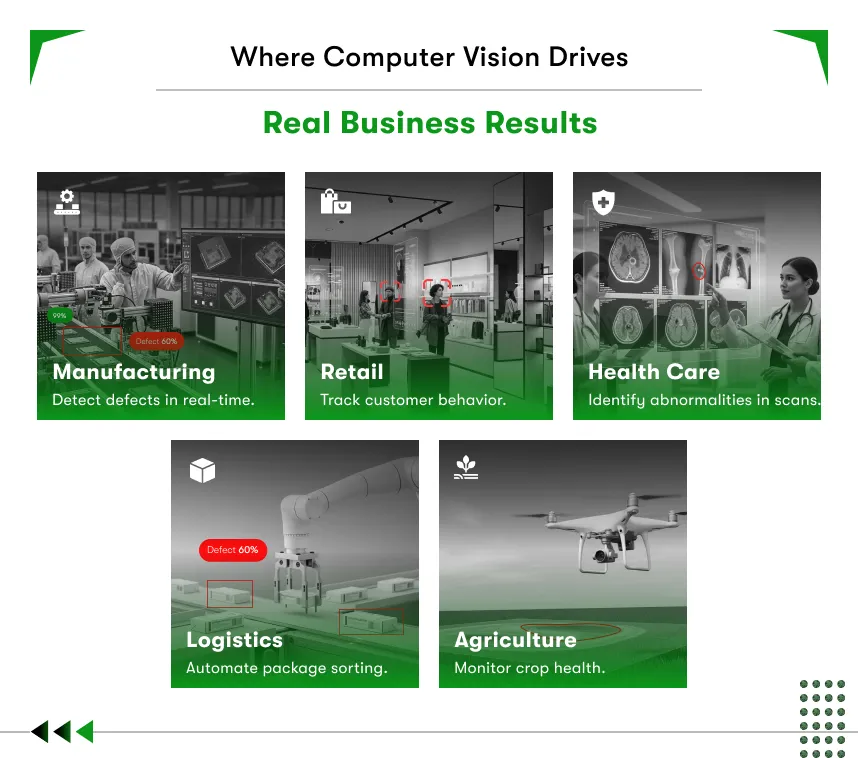
Automotive
Computer vision powers lane detection, obstacle recognition, and driver monitoring systems. Real-time visual processing keeps vehicles and passengers safe.
Healthcare
Computer vision models detect cancers, diabetic retinopathy, and fractures from medical scans. Hospitals reduce diagnostic time and improve early detection accuracy.
Retail
Cashierless stores, theft detection, and customer behavior analytics run on computer vision models. Retailers reduce shrinkage and make smarter store layout decisions.
Manufacturing
Automated visual inspection detects micro-defects on production lines. Computer vision systems inspect thousands of units per minute with consistent, repeatable accuracy.
Logistics
Package dimension measurement, barcode scanning, and automated sorting run on computer vision. Warehouses operate faster with fewer manual errors per shift.
See the full breakdown in Kody’s computer vision for industries resource.
How to Build a Computer Vision System for Your Business?
Building a computer vision system starts with a clearly defined visual problem. Data collection, model training, and deployment follow in sequence. Partnering with an experienced computer vision software development company reduces time-to-market and project risk significantly.
Here is the development roadmap recommended for businesses:
Step 1: Define the Visual Problem
What must the machine see, detect, or decide? A clear problem statement shapes every technical decision ahead.
Step 2: Collect and Label Training Data
Computer vision models need thousands of accurately labeled images. Data quality directly impacts model accuracy and real-world performance.
Step 3: Select the Right Model Architecture
Choose the architecture based on the task. CNNs for image classification. YOLO variants for object detection. Vision Transformers for complex scene understanding.
Step 4: Train and Validate
Train the model on labeled data. Validate performance against a separate test dataset. Measure accuracy, precision, recall, and F1 score consistently.
Step 5: Deploy
Deploy on edge devices, cloud infrastructure, or embedded hardware. The deployment environment depends on latency requirements and scale targets.
Step 6: Monitor and Retrain
Computer vision models need ongoing performance monitoring. Real-world data shifts over time. Regular retraining keeps accuracy high and reliable.
Understanding computer vision software development cost requires factoring in data volume, model complexity, deployment environment, and ongoing maintenance investment.
Quick Decision Framework: Build vs. Buy
Here’s a quick decision making framework for you in case you are confused whether you want to build the system or buy it.
| Decision | Options | Recommendation |
| Build vs Buy | Custom development or pre-built APIs | Custom for unique use cases; APIs for standard tasks |
| Cloud vs Edge | Cloud deployment or on-device processing | Edge for real-time; Cloud for batch analysis |
| Supervised vs Unsupervised | Labeled data training or pattern discovery | Supervised for most business use cases |
| Open Source vs Proprietary | TensorFlow / PyTorch or enterprise platforms | Open source for flexibility and cost control |
What should you look for when hiring computer vision developers?
Look for developers with hands-on deep learning experience, real-world deployment records, and industry-specific knowledge relevant to your use case. Portfolio results and past client outcomes matter far more than certificates or listed tool names.
Want to hire computer vision developers without costly mistakes? Use the criteria below:
Technical Skills to Verify:
- Strong Python proficiency with TensorFlow, PyTorch, or Keras
- OpenCV experience for image preprocessing and pipeline building
- Knowledge of model optimization: quantization, pruning, and distillation
- Familiarity with edge deployment hardware such as NVIDIA Jetson or Raspberry Pi
Domain Knowledge to Ask About:
- Understanding of your industry’s specific visual challenges
- Ability to advise on data collection and annotation strategy
- Experience with labeling platforms such as Labelbox or Roboflow
Process and Communication Standards:
- Clear project documentation practices
- Agile project management with transparent progress reporting
- Ability to explain technical decisions in plain business language
Questions to Ask Before Signing Any Contract:
- Can you share a case study from a comparable industry?
- How do you handle model performance degradation after deployment?
- What data privacy and security measures does the project follow?
- How do you define and measure success for a computer vision project?
In cases where you can not find a dedicated computer vision developers directly you can always content a computer vision software development company and hire developers or entire team from them.
Common Mistakes Businesses Make in Computer Vision Projects
Most computer vision projects fail not because of bad technology. Poor planning causes most failures.
Watch out for these common pitfalls:
Mistake 1: Underestimating Data Requirements
Computer vision models need high-quality labeled data in large volumes. Most businesses underestimate the volume and cost of data collection and annotation before development begins.
Mistake 2: Mismatching Model Complexity to Hardware
A heavy detection model on a low-power edge device creates unacceptable latency. Match model complexity to hardware capability from day one.
Mistake 3: Ignoring Edge Cases
Models trained on clean studio images fail in messy real-world environments. Diverse training data covering edge cases builds robust, reliable models.
Mistake 4: Skipping Post-Deployment Monitoring
A deployed model without ongoing monitoring will degrade in accuracy. Production data shifts over time. Regular retraining keeps model performance within acceptable ranges.
Mistake 5: Skipping the Proof of Concept
A full production build without a proof-of-concept stage wastes budget. Validate the use case with a small-scale prototype before committing to full development.
For a complete project preparation checklist, read Kody’s Computer Vision development guide.
Computer Vision vs Image Processing: Which One Does Your Business Actually Need?
The answer depends on what you need the visual data to do. If you need cleaner, more usable images, image processing solves that. If you need machines to understand what is in those images and act on it, computer vision is the answer. Most serious automation deployments need both, working together in a well-engineered pipeline.

Here is the practical summary your team can take into any technology discussion:
Image processing, if your business needs pixel-level enhancement, as it’s rule-based, Deterministic, and no AI is required.
Computer vision, if your business requires visual understanding, as it is AI-powered, the system will learn from data and drive decisions and actions.
In production pipelines, image processing prepares the data. Computer vision interprets it and acts on it.
The ROI difference is significant: computer vision deployments deliver 99-200% returns in 12–18 months.

Conclusion
The difference between computer vision and image processing comes down to a single question. Does the business need a better-looking image? Or does the business need a machine that understands the image?
Image processing handles pixel improvement for human review. Computer vision handles automated visual decision-making at scale. Get the choice wrong, and the AI investment stalls before delivering any value. Get the choice right, and the system runs autonomously, accurately, and at scale across thousands of visual inputs per day.
Kody Technolab builds custom AI vision systems for businesses across theworld. From initial computer vision consulting to full-scale deployment, the team builds the right solution for the specific business goal. If you want to start your business with the right system from day one, contact experts today!
FAQs: Computer Vision vs Image Processing
Q1. Is computer vision the same as image processing?
No, image processing modifies or enhances an image for human review. Computer vision interprets the image and produces an automated decision. Both work with visual data, but the output and intelligence level are completely different.
Q2. Which is harder to build, an image processing system or a computer vision system?
Computer vision is significantly harder to build but offers better return. A computer vision software development project requires labeled training data, deep learning models, and ongoing retraining after deployment. Image processing relies on deterministic algorithms and needs far less data and time to deploy.
Q3. Do all computer vision applications use image processing?
Most of them do. Image processing acts as a preprocessing step inside a computer vision pipeline. Cleaner input images produce more accurate model predictions. Skipping the preprocessing step often reduces detection accuracy in real-world environments.
Q4. How much does computer vision software development cost?
Computer vision software development cost depends on four factors: data volume, model complexity, deployment environment, and maintenance requirements. A basic proof-of-concept starts at a lower budget. A full production system with edge deployment and ongoing retraining costs significantly more. Get a scoped estimate before committing to a full build.
Q5. When should a business hire computer vision developers instead of using a pre-built API?
Hire computer vision developers when the use case is unique, sensitive, or requires custom model training on proprietary data. Pre-built APIs work for standard tasks like basic object detection or OCR. Custom development delivers better accuracy, data privacy, and long-term scalability for complex business needs.
Q6. What industries get the most value from computer vision development?
Any industry who uses computer vision gets better results. Industries like manufacturing, healthcare, retail, logistics, and automotive report the strongest returns from computer vision development. Each sector processes high volumes of visual data daily. Automating that analysis reduces inspection costs, cuts error rates, and speeds up operations at scale.