Quick Summary: Most Computer Vision Tools fail in production because teams choose them based on tutorials rather than operational requirements. This guide explains which tools handle real deployment constraints, how to evaluate libraries beyond GitHub stars, and what technology decisions protect long-term investment. You learn to match tooling capabilities to actual business problems instead of chasing frameworks that work great in notebooks but collapse under production load.
The selection of computer vision tools determines whether projects deliver operational value or become expensive technical debt that requires constant maintenance. Teams choose frameworks based on online tutorials and vendor marketing without evaluating deployment readiness for production environments. Projects fail more often from poor tooling choices that create integration nightmares than from weak conceptual ideas about what the vision should accomplish.
Tools affect processing speed, model accuracy, infrastructure scalability, and total ownership costs across the system lifecycle. A computer vision library that performs well on test datasets might introduce latency that kills real-time inspection or lack APIs that trigger actions in manufacturing execution systems. Leaders need clarity when evaluating actual production requirements, rather than simply recognizing open-source names generating hype on developer forums without proven enterprise track records.
Understanding how does computer vision works helps executives separate tooling decisions that support sustainable deployments from experiments that create technical debt that teams cannot maintain long-term without constant rework.
How Leaders Should Evaluate Computer Vision Tools
How should businesses choose computer vision tools and libraries?
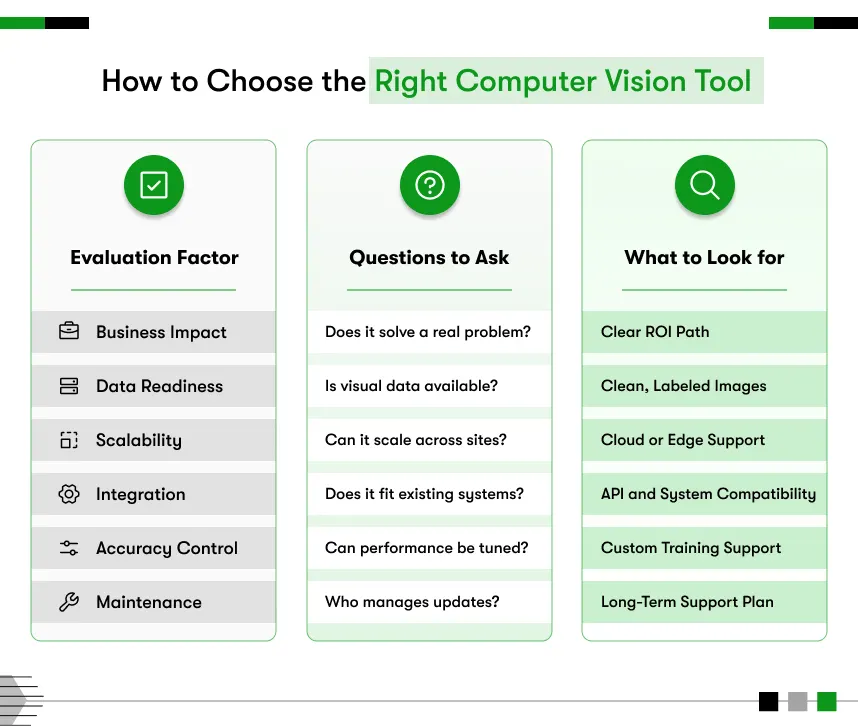
Businesses should evaluate Computer Vision Tools based on use-case fit, scalability potential, ease of integration with existing systems, availability of talent pools, and total ownership cost projections. The right tool supports production deployment under actual operational constraints, not only laboratory experimentation with clean datasets.
Tooling evaluation requires matching technical capabilities against specific operational requirements rather than selecting popular frameworks without understanding deployment constraints. The best tool for computer vision in automotive inspection differs significantly from that for retail analytics because latency tolerance, accuracy requirements, and integration complexity vary dramatically across use cases. Projects succeed when tool selection addresses real production bottlenecks rather than impressive benchmark performance under controlled testing conditions.
Deployment readiness determines whether tools transition from development environments to production systems, processing thousands of daily decisions reliably. Libraries lacking robust error handling, monitoring capabilities, or version control integration create operational risks when teams discover limitations only after committing development resources. Production-ready tools support rollback procedures, performance monitoring, and graceful degradation when edge cases exceed training data coverage.
Performance and accuracy control affect whether systems meet operational requirements for detection speed and error rates across variable conditions. Real-time inspection demands processing latency under 100 milliseconds, while batch analytics tolerates minutes per image without affecting workflows. Accuracy tuning capabilities determine whether teams can optimize precision-recall tradeoffs matching business requirements for false positive versus false negative costs.
Ecosystem and community support impacts problem resolution speed when deployment issues emerge requiring expertise beyond internal team capabilities. Active communities provide troubleshooting resources, integration examples, and performance optimization guidance, reducing the time teams spend solving common problems. Commercial tools offer vendor support with service level agreements, while open-source options depend on community responsiveness, varying across different frameworks.
Long-term maintenance effort determines total ownership costs beyond initial development expenses when models require retraining or systems need updates. Tools with stable APIs reduce rework when upgrading versions, while fragmented ecosystems create integration breaks requiring constant attention. Organizations exploring Computer Vision Software Development Cost benefit from evaluating maintenance projections alongside upfront implementation expenses.
Core Categories of Computer Vision Tools
Computer vision development tools fall into distinct categories addressing specific workflow stages from image preprocessing through production deployment and monitoring.
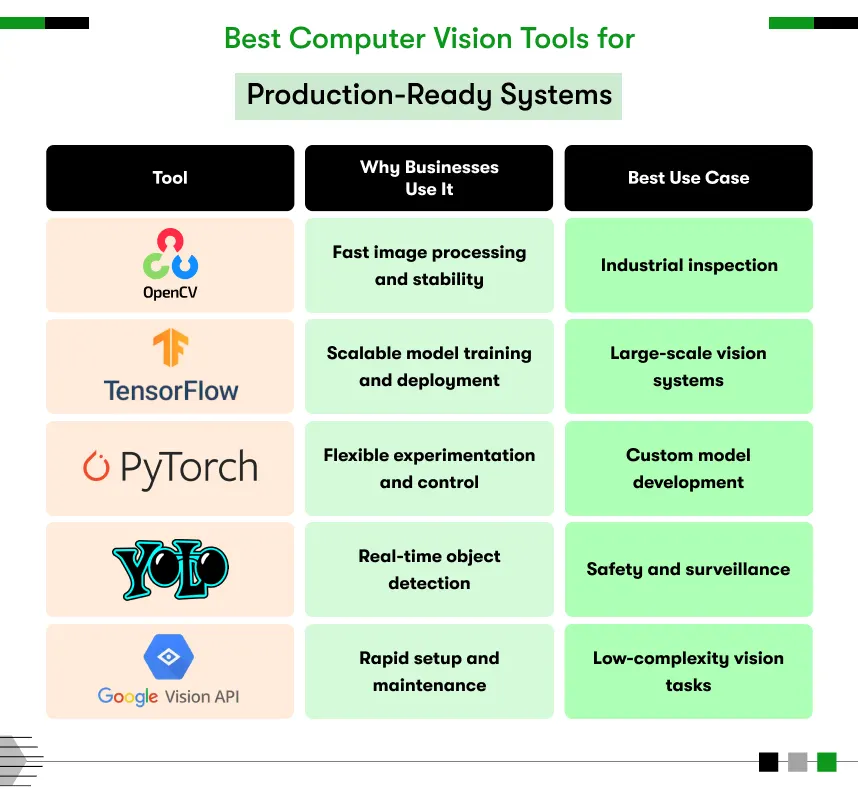
Image Processing Libraries
Image processing libraries handle transformation, filtering, and enhancement operations preparing visual data for analysis algorithms. These tools resize images, adjust contrast, remove noise, and apply filters, improving detection accuracy under variable lighting conditions. Preprocessing operations normalize input data, eliminating environmental variations that would otherwise reduce model performance across different camera installations or ambient conditions.
Production workflows use processing libraries that convert raw camera feeds into standardized formats that models expect during training. Color space conversions, geometric transformations, and histogram equalization operations happen before detection algorithms analyze prepared images. Processing speed affects overall system throughput because transformation operations add latency before actual inference occurs.
Deep Learning Frameworks
Deep learning frameworks train and deploy vision models supporting object detection, image classification, and semantic segmentation tasks. These platforms provide neural network architectures, optimization algorithms, and deployment utilities that teams need to build custom models matching specific operational requirements. Framework selection determines available model architectures, training speed, and deployment flexibility across edge devices versus cloud infrastructure.
Production systems require frameworks supporting model versioning, A/B testing, and rollback capabilities when new versions underperform expectations. Training pipelines depend on framework efficiency utilizing GPU resources during iterative model refinement cycles. Deployment utilities affect latency and resource consumption when models run on edge hardware with limited processing capacity.
Annotation and Dataset Tools
Annotation tools enable teams to label images and videos, creating training datasets that models learn from during development. Computer vision annotation tool platforms support bounding box drawing, polygon segmentation, and keypoint marking across thousands of images requiring consistent labeling. Dataset quality directly determines model accuracy because algorithms learn only patterns that labeled examples demonstrate during training cycles.
Production-ready annotation platforms support collaboration workflows where multiple team members label data with quality control processes ensuring consistency. Version control tracks dataset changes as teams add examples covering edge cases discovered during pilot testing. Efficient annotation reduces time from data collection to model training, enabling faster iteration cycles.
Model Deployment and MLOps Tools
Deployment platforms manage model versioning, performance monitoring, and continuous improvement workflows supporting production operations. MLOps tools track prediction confidence distributions, detect accuracy drift, and trigger retraining workflows when model performance degrades. Computer vision programming tool suites integrate deployment pipelines with existing CI/CD infrastructure teams already use for software releases.
Production monitoring identifies when models encounter input patterns differing from training data distributions, requiring human review. Automated retraining pipelines incorporate new labeled examples, improving model coverage of operational edge cases. Version management enables rollback when updated models introduce regression errors affecting accuracy.
Popular Computer Vision Libraries Used in Production
Organizations deploy proven libraries for computer vision, balancing community support, performance characteristics, and integration capabilities to match their operational requirements.
OpenCV
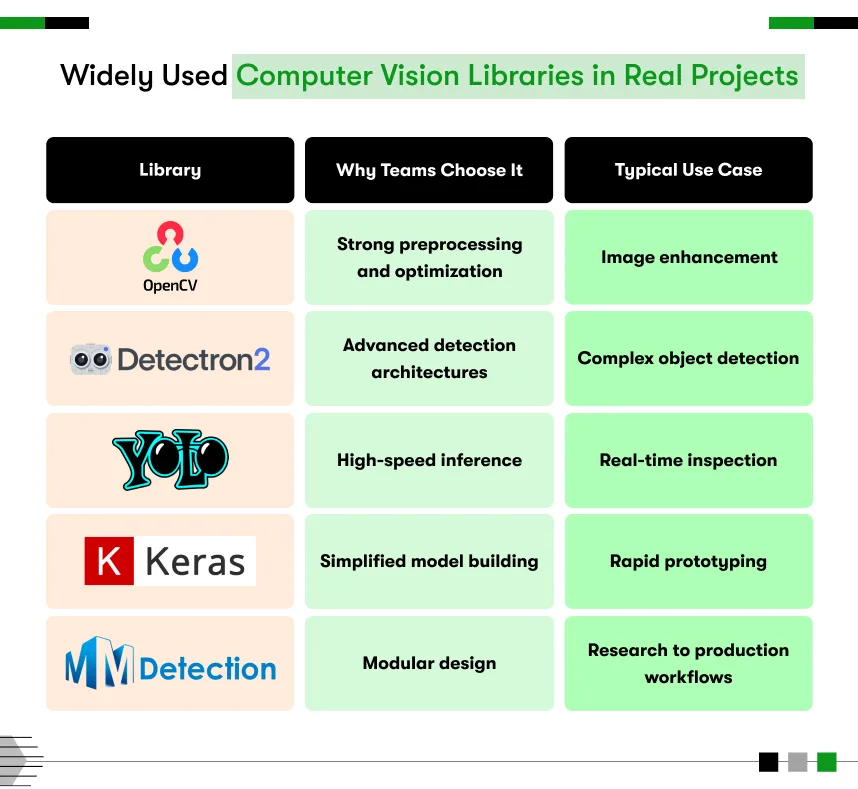
OpenCV provides comprehensive image processing and traditional computer vision algorithms that teams use for preprocessing, feature extraction, and classical detection methods. The library handles camera interfacing, video processing, and geometric transformations, supporting pipeline development from capture through analysis. Production systems leverage OpenCV performance optimizations utilizing CPU and GPU acceleration for real-time processing requirements.
Strong community support provides extensive documentation, code examples, and troubleshooting resources, reducing development time when teams encounter implementation challenges. Cross-platform compatibility enables consistent code execution across development workstations, edge devices, and cloud infrastructure. Mature stability makes OpenCV reliable for production deployments requiring long-term support without constant library updates breaking existing implementations.
TensorFlow and PyTorch
TensorFlow and PyTorch serve as core frameworks for vision model development, supporting research experimentation and production deployment workflows. These platforms provide pre-trained models, transfer learning capabilities, and optimization tools that teams use to build custom detectors matching specific operational requirements. Framework ecosystems include deployment utilities supporting edge devices, mobile applications, and cloud infrastructure.
Production teams choose between frameworks based on deployment targets, performance requirements, and existing technical expertise within organizations. TensorFlow offers comprehensive production tools while PyTorch provides research flexibility with strong community adoption across academic institutions. Both frameworks support model conversion to optimized formats, reducing inference latency on resource-constrained hardware.
Detectron and YOLO Frameworks
Detectron and YOLO frameworks focus on real-time object detection, supporting industrial inspection and edge applications requiring low-latency responses. These specialized tools provide state-of-the-art detection architectures optimized for speed-accuracy tradeoffs matching production constraints. Industrial deployments use these frameworks when detection latency directly affects throughput on manufacturing lines or safety monitoring systems.
Real-time performance enables millisecond-level detection supporting inline inspection without slowing production processes. Pre-trained models accelerate development by providing starting points that teams fine-tune using domain-specific datasets. Framework optimizations utilize GPU acceleration delivering detection speeds supporting video analysis at full frame rates. Successful computer vision examples across manufacturing often rely on these real-time detection frameworks.

Cloud-Based Computer Vision Platforms
Cloud platforms provide managed infrastructure and pre-built models, reducing development effort but introducing dependency on vendor ecosystems.
Managed Vision APIs
Managed APIs offer pre-trained models handling common vision tasks like object detection, face recognition, and optical character recognition. These services provide a faster time to market by eliminating model training when generic capabilities match business requirements. API-based approaches suit applications where customization needs remain limited, and vendor model accuracy proves sufficient.
Limited customization restricts adaptation to specialized use cases requiring domain-specific training data or unique detection criteria. Vendor lock-in creates migration challenges when organizations need greater control or when pricing models become unsustainable. Network dependency introduces latency and availability risks when cloud connectivity affects time-sensitive operations.
Custom Vision Platforms
Custom platforms provide full control over model architectures, training data, and deployment infrastructure supporting specialized requirements. Organizations maintain data sovereignty and intellectual property while optimizing models for specific operational constraints. Higher engineering investment requires dedicated technical teams managing infrastructure, training pipelines, and deployment workflows.
Control enables optimization for unique edge cases and proprietary processes that competitors cannot replicate through generic APIs. Infrastructure ownership eliminates ongoing API usage costs, benefiting high-volume applications processing millions of images monthly. Technical complexity demands that teams must develop or acquire expertise through hiring experienced practitioners.
Open-Source vs Commercial Tools
Should businesses choose open-source or commercial computer vision tools?
Open source computer vision library options offer flexibility and cost control, while commercial tools provide faster deployment and vendor support. The best choice depends on operational scale, customization depth requirements, and in-house technical expertise available for ongoing maintenance and optimization efforts.
Open-source tools eliminate licensing costs and provide complete transparency into implementation details that teams can modify. Community-driven development delivers rapid innovation and extensive ecosystem support through shared contributions. Technical teams gain flexibility by customizing every aspect, matching specific operational requirements without vendor restrictions limiting adaptation.
Commercial tools reduce time to deployment through vendor engineering, managed infrastructure, and guaranteed support responsiveness. Service level agreements provide reliability assurances critical for production systems affecting business operations. Vendor relationships simplify procurement, budgeting, and long-term roadmap planning compared to managing multiple open-source dependencies.
Best computer vision library selection balances control versus convenience based on whether differentiation requires proprietary implementations or whether standard capabilities suffice. Organizations with strong technical teams often prefer open-source flexibility, while those prioritizing speed choose commercial platforms. Understanding Computer Vision for Industries helps benchmark which approach competitors successfully deploy in similar operational contexts.
Technology Stack for Enterprise Computer Vision Projects
Enterprise deployments require coordinated technology stacks addressing every stage from data capture through production monitoring and continuous improvement.
Cameras and edge devices capture visual data at quality levels supporting accurate detection under operational lighting and positioning constraints. Industrial cameras provide controlled frame rates, resolution, and environmental durability that consumer equipment cannot match. Edge computing hardware processes images locally when latency requirements prohibit cloud round-trip delays affecting real-time decisions.
Data pipelines and storage manage image ingestion, preprocessing, and archival, supporting both training workflows and production inference. Scalable storage handles petabyte-scale datasets accumulated across distributed camera installations over months. Pipeline orchestration coordinates preprocessing, model inference, and result delivery to downstream enterprise systems.
Model training and validation infrastructure supports iterative development cycles where teams refine models using labeled datasets and production feedback. GPU clusters accelerate training, enabling faster experimentation with different architectures and hyperparameters. Validation frameworks ensure models meet accuracy requirements before production deployment, preventing regression errors.
Deployment infrastructure runs inference workloads at scale across edge devices, on-premise servers, or cloud platforms matching latency and throughput requirements. Container orchestration manages model versioning, traffic routing, and resource allocation across distributed installations. Monitoring systems track inference latency, prediction confidence, and system health alerting teams when performance degrades.
Integration with enterprise systems triggers downstream actions in manufacturing execution, warehouse management, and quality databases based on vision outputs. Middleware translates vision results into formats that legacy systems consume without requiring complete platform replacements. API gateways manage authentication, rate limiting, and protocol translation between vision services and enterprise applications. Organizations exploring Computer Vision Development guide benefit from understanding complete stack requirements beyond individual tool selection.
Common Challenges When Using Computer Vision Tools
Computer Vision Tools introduce operational challenges beyond initial proof-of-concept development, requiring careful planning and ongoing management attention.
Tool fragmentation across preprocessing, training, deployment, and monitoring stages creates integration complexity when components lack interoperability. Teams spend significant effort building glue code connecting disparate tools into cohesive pipelines. Version compatibility issues arise when updating one component breaks integrations with dependencies requiring synchronized upgrades.
Skill gaps emerge when tool selection demands expertise that organizations lack internally, requiring hiring or training investment. Specialized frameworks need practitioners to understand both computer vision theory and production engineering practices. Talent scarcity for niche tools creates retention risks when key individuals leave, taking institutional knowledge with them.
Performance tuning requires deep tool understanding, optimizing inference speed, memory consumption, and accuracy tradeoffs under production constraints. Default configurations rarely match operational requirements, demanding experimentation to find optimal settings. Profiling tools and performance benchmarks help identify bottlenecks but require expertise in interpreting results and implementing fixes.
Integration complexity increases when vision systems must interact with legacy enterprise platforms lacking modern APIs or standard protocols. Custom middleware development extends timelines and creates maintenance overhead when either vision tools or enterprise systems update. Testing integration points under production load reveals issues that laboratory testing misses, requiring iterative refinement.
Long-term maintenance demands ongoing attention, upgrading dependencies, patching security vulnerabilities, and retraining models as operational conditions drift. Tool ecosystems evolve at different paces, creating version mismatch headaches when components require incompatible dependency versions. Technical debt accumulates when teams defer updates to avoid breaking working systems, creating vulnerability exposure.
How to Choose the Right Computer Vision Tool for Your Use Case
Strategic tool selection matches technical capabilities against operational requirements through disciplined evaluation rather than following technology trends.
Define business objectives specifying what operational improvements vision systems must deliver before evaluating any technical options. Quantify acceptable accuracy levels, latency requirements, and throughput targets that vision solutions must achieve. Clear success criteria prevent technology selection from happening before understanding what success actually means in business terms.
Map tools to operational requirements, evaluating how different options address deployment constraints like edge processing, real-time response, or integration complexity. Prototype critical workflows, validating that selected tools actually support production scenarios rather than trusting marketing claims. Identify gaps between tool capabilities and requirements, determining whether customization fills holes or whether alternative selections better fit needs.
Validate with a pilot testing complete workflows end-to-end under realistic conditions before committing to enterprise-wide deployments. Measure actual performance against requirements under production data volumes and environmental variability. Pilot scope should include integration testing, performance benchmarking, and operational handoff procedures that teams will replicate at scale.
Plan for scaling and governance, defining how tools will support growth across additional use cases, locations, and data volumes. Establish model versioning, deployment procedures, and monitoring practices, preventing chaos when multiple teams deploy vision systems. Governance frameworks prevent tool sprawl, where different teams select incompatible options, creating fragmented ecosystems nobody can maintain. Organizations ready to deploy often need to hire Computer Vision Developers with production experience who understand tool selection implications beyond development convenience. Reviewing Computer Vision Applications and Examples reveals which Python libraries for computer vision successfully support similar operational requirements in comparable deployments.
Tools Enable Vision and Strategy Delivers Value
Computer Vision Tools provide technical capabilities, but strategic selection aligned with operational requirements determines whether projects deliver sustainable value or become expensive technical debt. Tools alone never guarantee success, regardless of benchmark performance or community popularity, when deployment fails to match actual production constraints. Organizations succeed by choosing tools supporting complete workflows from data capture through production monitoring instead of optimizing individual components in isolation.
Strategic selection drives sustainable ROI by balancing capability, complexity, and long-term maintenance effort against business value delivered. Computer vision library choices affect development speed, deployment flexibility, and total ownership costs across system lifecycles spanning years. Long-term thinking evaluating operational fit beats quick experiments adopting trending frameworks without understanding production implications or integration requirements.
Successful Computer Vision Project Ideas match tool capabilities to business constraints rather than forcing operational requirements into whatever frameworks developers already know. Leaders prioritizing production reliability over development convenience make decisions protecting investments when systems must operate continuously under variable conditions. Understanding computer vision consulting options helps organizations validate tool selections against proven deployment patterns before committing resources to approaches that create future regrets.
Kody Technolab Limited guides organizations through strategic Computer Vision Tools selection grounded in production deployment reality rather than laboratory convenience. As a Computer Vision Software Development Company, the team evaluates tool ecosystems against actual operational requirements, integration constraints, and long-term maintenance projections. Organizations seeking confident tooling decisions based on deployment experience rather than trending frameworks can engage Kody Technolab Limited for objective evaluation supporting sustainable production systems.

FAQ
What are the most popular Computer Vision Tools for production deployments?
OpenCV handles image processing and classical vision algorithms while TensorFlow and PyTorch train deep learning models for detection and classification. YOLO frameworks provide real-time object detection supporting industrial inspection requiring millisecond-level responses. Production teams choose tools based on deployment targets, latency requirements, and existing technical expertise rather than following tutorial popularity without evaluating operational fit.
How do I choose between open source computer vision library options and commercial platforms?
Open-source tools offer flexibility and cost control when teams possess expertise in managing infrastructure and troubleshooting issues independently. Commercial platforms accelerate deployment through vendor support and managed services when speed matters more than customization depth. Choose based on whether differentiation requires proprietary implementations or whether standard capabilities suffice for operational requirements without extensive modification.
What computer vision annotation tool should teams use for creating training datasets?
Select annotation platforms supporting collaboration workflows where multiple team members label data with quality control, ensuring consistency. Tools should handle your specific labeling needs like bounding boxes, polygon segmentation, or keypoint marking across image volumes. Cloud-based options enable distributed teams while desktop tools provide offline capability when data sensitivity prohibits external platforms.
Do Computer Vision Tools require GPU infrastructure, or can they run on standard servers?
Training deep learning models demands GPU acceleration, reducing iteration cycles from weeks to days during development. Inference workloads sometimes run efficiently on CPUs when throughput requirements stay modest and latency tolerance permits slower processing. Real-time applications typically need GPU or specialized accelerators meeting millisecond response requirements and production inspection demands.
How long does implementing computer vision development tools take from selection to production?
Tool evaluation and pilot testing require two to four months to validate capabilities under realistic conditions before production commitment. Enterprise deployment extending across multiple locations adds six to twelve months, depending on infrastructure readiness and integration complexity. Timeline compression happens when teams clearly define requirements upfront rather than discovering constraints during development, forcing tool changes mid-project.
What is the best tool for computer vision for manufacturing quality inspection versus retail analytics?
Manufacturing inspection prioritizes real-time detection frameworks like YOLO, handling millisecond latency requirements during inline processing. Retail analytics tolerates batch processing using comprehensive platforms that analyze customer behavior patterns across hours of footage. Tool selection depends on whether applications require immediate decisions affecting production flow or whether delayed analysis suffices for operational planning.
Can small teams implement Computer Vision Tools without dedicated infrastructure teams?
Managed cloud platforms reduce infrastructure burden through vendor-operated services when teams lack DevOps expertise in managing deployments. Simplified tools with limited customization enable small teams to deliver value without enterprise-scale engineering investment. However, production reliability eventually demands operational practices ensuring monitoring, incident response, and continuous improvement regardless of team size or tool selection.












 Contact Information