Quick Summary: How does computer vision work in real businesses, and why does it matter now? And just in case this is the question you have been pondering, this guide is an ideal, simple overview of the entire workflow. It demonstrates how companies can convert simple pictures and videos into automated decisions that cut costs, enhance accuracy, and scale operations with quantifiable returns. Whether it’s data capture and model training or deployment and integration, you will learn more about where computer vision will provide value, the pitfalls to avoid, and how to select the right partner with confidence, such that implementation will be successful.
How does computer vision work, and why should business executives be interested in this area of artificial intelligence before they commit serious money? Not many teams retrieve images and videos on a daily basis, and yet not many teams derive measurable value or make credible decisions. When vendors tell accuracy without specifying data requirements, risks, or unmentioned costs of implementation, leaders are often confused. Bad planning will lead to failed pilots, budget waste, and tools that do not make it into day-to-day activities across departments.
Cameras, drones, and inspection systems already exist in factories, stores, hospitals, and even warehouses as a source of visual data. Intelligent enterprises turn visual streams into alert systems, dashboards, and automated processes that reduce human labor and errors. Quality checks, safety metrics, compliance, and customer behavior scaling are now enabled by computer vision. Early adopters have to make quicker decisions, experience lower operational costs, and have more control over distributed teams.
Business leaders must have a roadmap, not hype, and you can find one in our Computer Vision Development guide to help you stay practical.
What Is Computer Vision?
Through computer vision, machines learn to read and comprehend images and video, identify patterns, and respond automatically to business commands, thereby enabling the organization to transform daily visual information into measurable actions that improve operations, reduce costs, and enhance process reliability across departments and locations.
Most enterprises already use CCTV cameras, mobile devices, drones, and inspection systems to gather large amounts of visual information. Recording footage by teams is usually not valuable, since extracting it through manual review is time- and budget-consuming. The transformation of computer vision revolutionizes that equation by converting raw images into structured knowledge that can be interpreted and processed by the software system in real time.
Traditional software is based on fixed rules set by the developers. Every rule can handle a familiar case, but cannot cope with emerging variations. The lights are switched, the camera angles are altered, the product shapes are varied, and accuracy soon declines. Computer vision is not rigid, as it learns models from thousands of labeled examples and identifies patterns rather than following a set of instructions.
Trained vision can be used to inspect products on a production line, count stock on shelves, check worker safety compliance, or alert to suspicious behavior without human oversight. Its system is continuously running, easy to scale across locations, and provides consistent results that managers can monitor through dashboards and reports.
Computer vision is an operational capability, not a research experiment, to be handled by business leaders. As implemented, the technology integrates cameras, data pipelines, and enterprise software into a single decision engine, enabling real-world results. Companies that require formal planning and technical guidance can use our Computer Vision Development guide to learn what successful launches entail, from idea to production.
Traditional Software vs Vision-Based AI
Usually, traditional software follows a fixed set of rules, whereas vision-based AI learns continuously and improves from data. Here’s a small breakdown for your better understanding:
| Aspect | Traditional Software | Computer Vision |
| Decision method | Predefined rules | Learned patterns |
| Handling change | Breaks with variation | Adapt with training data |
| Scaling effort | More manual work | Automated scaling |
| Accuracy growth | Stays constant | Improves over time |
| Business impact | Incremental gains | Operational transformation |
Understanding this difference helps leaders evaluate vendors realistically, set clear expectations, and invest in solutions that produce measurable business value rather than isolated experiments.
How Does Computer Vision Work?
Computer vision functions as a well-organized pipeline in which organizations take a visual image of what is happening in their operations, prepare and label images, train models to identify patterns, detect or track objects in live streams, and then relate the insights to business systems that automate decision-making and enhance the ability to measure performance.
All successful implementations follow this flow, since precision is not so much about algorithms as it is about disciplined implementation at every step. When teams jump into model training, they often find it difficult later, as employees perform poorly, work is redundant, and costs increase. A learning sequence helps leaders make better investment decisions and prevent costly pilot failures.
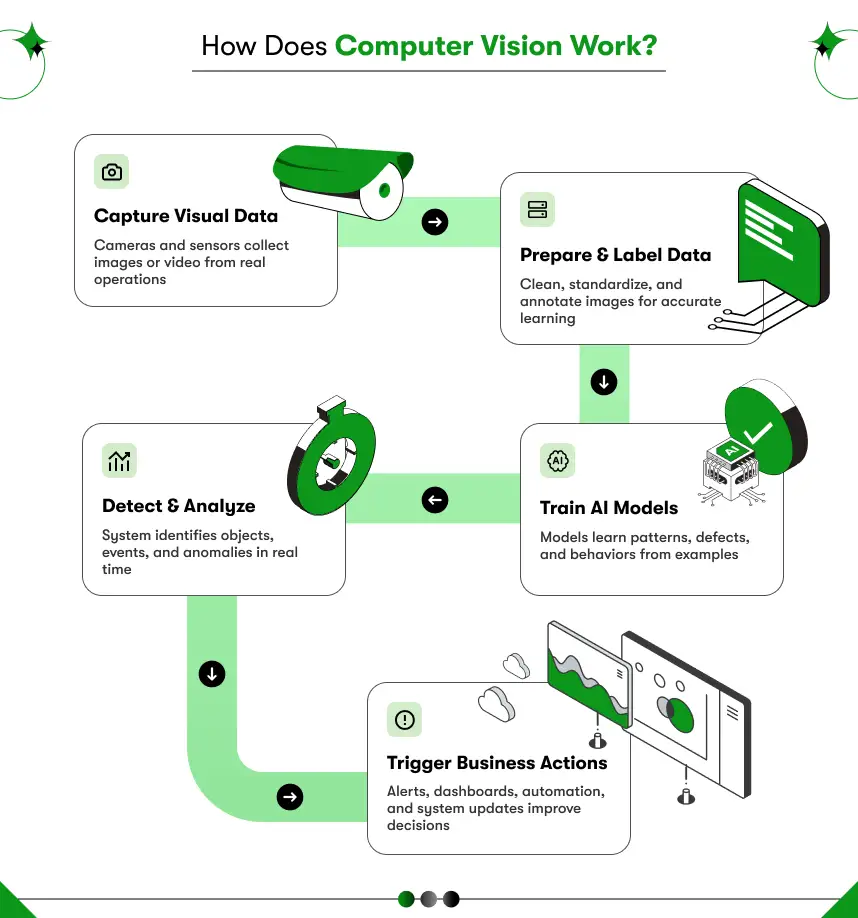
Step 1: Capture visual data from operations
The process starts by collecting clear, consistent cameras, sensors, or mobile devices to be installed in factories, warehouses, stores, or field locations. Most companies already store massive amounts of footage as a safety measure or for compliance, but few groups intend to capture with analytics in mind. Models do not cope well with variation in lighting, changes in angle, or a lack of resolution despite their sophistication. Effective projects, consequently, consider camera placement, frame rate, and visibility as engineering solutions, since the high quality of the input directly impacts downstream cost and reliability.
Step 2: Prepare and standardize the images
Once captured, the teams clean and organize the data so the system can learn effectively and deliver consistent output when in use. Engineers remove unused frames, match image sizes, and provide a consistent format used across devices. At the same time, subject matter experts label objects or defects to help the model learn what is important in a real business environment. The model’s success usually depends on careful labeling, since it learns precisely from the examples provided; therefore, false or unstable labels lead to inaccurate predictions. Computer vision consulting is often sought by many organizations in search of early guidance on how to avoid months of time-consuming dataset preparation.
Step 3: Train models to recognize patterns
After the dataset is prepared, machine learning models learn from thousands of labeled images to identify trends such as shapes, textures, and movements associated with business outcomes, such as defects or safety hazards. The system repeatedly varies internal parameters until predictions match known results, rather than using fixed rules. Performance increases as more diverse data become available, enabling the model to cope with real-world variation without reprogramming. Many businesses aiming for production-level reliability typically use a dedicated Computer Vision Software Development Company to create, train, and validate models.
Step 4: Detect, classify, and track events
After training, the system processes live video streams and converts raw pixels into structured information that software can interpret automatically. The model detects objects, classifies them, and tracks movement across frames so managers can understand what happened, where it occurred, and how often events recur. Such analysis allows organizations to count inventory, monitor safety compliance, detect anomalies, or measure throughput without assigning additional staff to constant visual checks.
Step 5: Turn insights into business action
The value of computer vision is realized when insights are used to generate actions within normal workflows, not within demonstration dashboards. The malfunction can be prevented by a defect-detection model that will immediately stop the production line, a retail system that will update stock levels on its own, and a safety warning that will inform supervisors in real time. Integration with ERP, MES, or warehouse systems ensures that decisions are made instantly and consistently across all locations. Enterprise rollout preparation teams frequently recruit Computer Vision Developers who are familiar with AI models and system integration, so results translate directly into operational benefits.
Computer Vision Workflow Overview
| Stage | Purpose | Business Outcome |
| Data capture | Collect reliable visuals | Strong foundation |
| Preparation | Clean and label images | Higher accuracy |
| Training | Learn patterns | Intelligent detection |
| Live analysis | Detect and track | Real-time insights |
| Integration | Trigger actions | Measurable ROI |
Following this structured process turns scattered visual data into predictable decisions that scale across teams and locations.
How computer vision works in AI systems behind the scenes
Computer vision relies on deep learning models, training frameworks, and scalable infrastructure that process visual data continuously, learn patterns from examples, and deliver predictions through cloud or edge systems that integrate directly with business software and operational environments.
Many leaders hear technical terms such as neural networks and assume they are highly complex. The reality feels simpler when viewed from an operational lens. Each layer performs a clear role, much like databases, APIs, and dashboards support traditional enterprise software. Understanding these building blocks helps decision makers evaluate vendors without getting lost in jargon.
Convolutional Neural Networks
Most modern vision systems use Convolutional Neural Networks, often called CNNs, which scan images in small regions, detect edges and textures, combine those signals into shapes, and finally recognize meaningful objects such as products, people, or defects.
You can imagine the network as a series of filters that look at an image step by step. Early layers detect simple patterns like lines or curves. Middle layers combine those patterns into parts such as corners or surfaces. Final layers recognize complete objects that match business categories. This gradual learning process allows the system to handle variations in lighting, angle, and background without manual rules.
For business leaders, the key takeaway remains practical rather than technical. Better data and better training produce better results, while algorithm choice rarely becomes the main constraint during deployment.
Role of deep learning frameworks
Behind every trained model sits a framework that manages training, testing, and deployment efficiently across hardware resources. These frameworks handle data pipelines, performance optimization, and version control so engineering teams can focus on outcomes rather than low-level math or infrastructure maintenance.
Popular frameworks accelerate experimentation and shorten development cycles. Teams can test multiple models quickly, measure accuracy, and select the best option before production rollout. Faster iteration reduces risk and helps organizations reach value sooner. Many companies evaluate different Computer Vision Tools and library options early to ensure compatibility with existing systems and long-term scalability.
Cloud vs edge-based vision systems
Where the system runs often matters as much as how the model learns. Deployment typically happens either in the cloud, at the edge, or through a hybrid approach that balances speed and cost.
Cloud systems centralize processing on remote servers, making scaling easier and simplifying updates across multiple sites. Edge systems process data locally on devices near the camera, reducing latency and protecting sensitive information. Real-time use cases such as safety monitoring or machine control often require edge processing because even small delays can affect operations.
The right choice depends on business constraints rather than technical preference. Retail analytics can tolerate cloud latency, while production line automation usually requires real-time decisions at the edge. Experienced partners guide this architecture early so performance matches operational needs.
Computer Vision Technology stack
| Layer | Purpose | Business Impact |
| Models (CNNs) | Learn visual patterns | Accurate detection |
| Frameworks | Train and deploy models | Faster development |
| Infrastructure | Cloud or edge compute | Reliable performance |
| Integrations | APIs and workflows | Direct automation |
When leaders understand this stack, vendor conversations shift from buzzwords to measurable trade-offs such as cost, speed, and reliability. Organizations planning long-term initiatives often engage a specialized Computer Vision Software Development Company to design an architecture that supports growth without constant redesign.
Where do businesses use computer vision in real operations?
Businesses use computer vision across manufacturing, retail, healthcare, logistics, and security to automate inspections, monitor environments continuously, detect risks early, and generate real-time insights that improve speed, accuracy, and cost control without increasing headcount. Most leaders first see computer vision as a future innovation, yet many competitors already apply visual AI quietly inside daily workflows across sites.
Cameras already exist across facilities, which means the opportunity often starts with software rather than new hardware investment. Leaders who want deeper, sector-specific ideas can explore our Computer Vision for Industries resource to see how different markets deploy vision systems successfully. The sections below show how organizations apply vision systems today and where measurable gains appear quickly.
Manufacturing: quality inspection and defect detection
Manufacturers use computer vision to inspect products automatically on high-speed production lines, where human inspectors cannot maintain consistent accuracy or keep pace with throughput demands.
Cameras capture every unit as it moves across the line, and models detect scratches, misalignment, missing components, or packaging errors instantly. The system flags defects, removes faulty items, and records data for root cause analysis. Teams reduce manual inspection costs while improving consistency and traceability.
Common outcomes include:
- Lower defect escape rates
- Faster inspections
- Reduced rework and scrap
- Documented compliance
Many factories explore proven scenarios through Computer Vision Applications and Examples before selecting the first pilot.

Retail: customer behavior and shelf monitoring
Retailers rely on computer vision to understand store activity, maintain shelf availability, and reduce revenue loss caused by stockouts or shrinkage.
Vision systems count visitors, track movement patterns, and identify which zones attract attention. Shelf cameras detect empty spaces and trigger restocking tasks automatically. Loss prevention teams receive alerts for suspicious behavior without reviewing hours of footage manually.
Such insights help managers adjust staffing, optimize layouts, and protect margins using data rather than guesswork.
Healthcare: medical imaging support
Healthcare providers apply computer vision to analyze medical images and assist specialists in detecting abnormalities earlier and more consistently.
Models highlight suspicious regions in X-rays, CT scans, or pathology slides, which helps clinicians focus attention faster and reduce oversight risk. The system supports decision-making rather than replacing experts, which improves throughput without compromising care quality. Hospitals often begin with targeted use cases where delays directly affect patient outcomes.
Logistics: tracking and damage detection
Logistics teams use computer vision to track parcels, verify labels, and detect damaged packages automatically inside fast-moving distribution centers.
Cameras scan items during sorting and match visual data with shipment records in real time. The system identifies crushed boxes, missing labels, or routing errors before dispatch. Early detection prevents returns and customer complaints while improving delivery reliability. Automation at this stage protects both cost and brand reputation.
Security and compliance: monitoring and access control
Organizations strengthen safety and compliance using vision systems that monitor environments continuously and flag risks immediately.
Systems verify protective gear usage, restrict unauthorized access, and detect unusual behavior across large sites. Automated alerts allow faster response while reducing the burden on security teams.
Such deployments improve safety metrics and reduce liability exposure.
Here’s an Industry summary and their typical use case with measurable benefits
| Industry | Typical Use Case | Measurable Benefit |
| Manufacturing | Defect detection | Lower scrap and rework |
| Retail | Shelf monitoring | Higher sales uptime |
| Healthcare | Imaging analysis | Faster diagnosis support |
| Logistics | Parcel tracking | Fewer delivery errors |
| Security | Risk detection | Safer operations |
Across all sectors, the pattern stays consistent as visual data already exists, and Intelligent analysis converts that data into faster decisions and lower operational costs.
What business value does computer vision actually deliver?
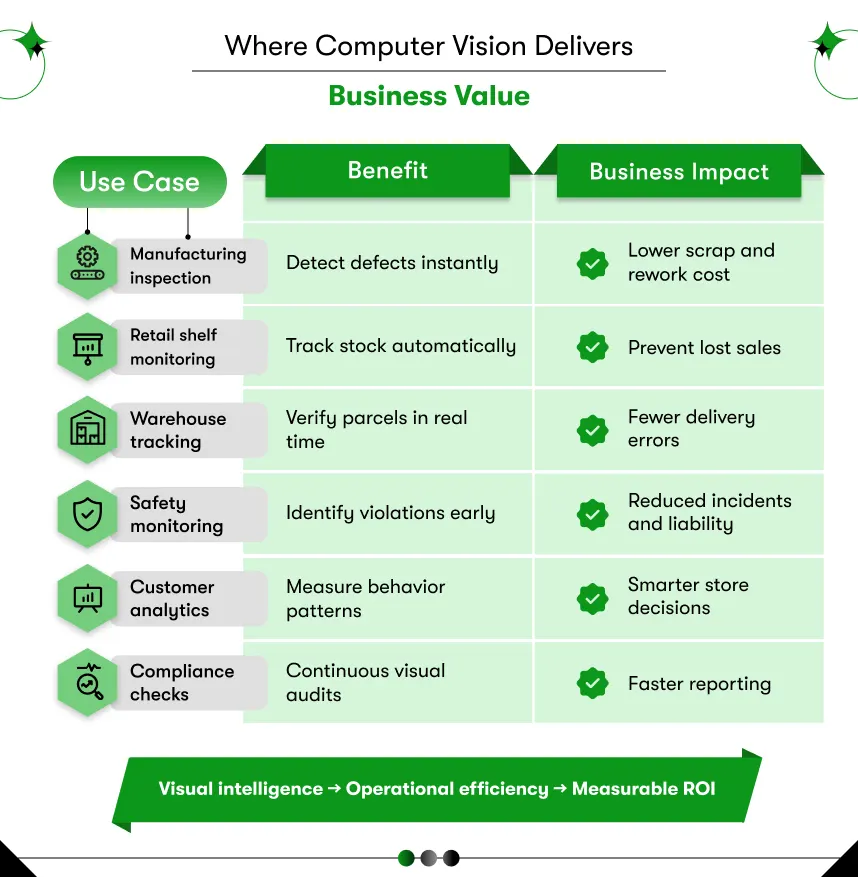
Computer vision reduces manual inspection costs, improves decision speed, increases operational accuracy, and scales processes across locations without proportional hiring, which helps organizations convert existing camera data into measurable financial returns and stronger operational control.
Many leaders evaluate computer vision as a technology expense, but experienced operators treat it as an efficiency engine that pays back quickly. The difference comes from focusing on outcomes such as labor savings, error reduction, and throughput gains rather than model accuracy alone. When aligned with clear metrics, vision projects move from experimentation to predictable ROI within months.
Lower operating costs through automation
Manual visual tasks consume significant time because staff must watch screens, inspect products, and record findings repeatedly across shifts. Computer vision handles those repetitive checks continuously without fatigue, which allows teams to redeploy people toward higher-value responsibilities such as analysis, planning, or customer service.
Organizations often reduce inspection labor, overtime, and rework simultaneously. The savings compound as operations scale across additional sites.
Faster decisions using real-time insights
Business environments change quickly, and delayed information often leads to losses that could have been avoided with earlier action. Vision systems analyze live streams instantly and trigger alerts the moment an issue appears, which helps teams respond before small problems escalate into costly disruptions.
A production defect can stop the line immediately.
A safety violation can notify supervisors instantly.
An empty shelf can trigger replenishment before sales drop.
Such speed improves responsiveness and protects revenue consistently.
Higher accuracy than manual inspection
Human inspection varies across shifts and individuals because fatigue, distraction, and workload affect consistency. Computer vision applies the same standards every second, which reduces missed defects and false approvals while maintaining uniform quality across all locations.
Consistent detection improves compliance reporting and customer satisfaction. Teams also gain traceable records for audits and root cause analysis, which strengthens operational discipline.
Scalability without proportional hiring
Traditional processes require more staff as operations grow. Vision systems scale differently because one trained model can run across dozens or hundreds of cameras with minimal incremental cost. This structure allows organizations to expand coverage without matching increases in headcount.
A retailer can monitor hundreds of stores centrally.
A manufacturer can inspect every unit instead of random samples.
A logistics network can track thousands of parcels simultaneously.
Such scalability supports growth without eroding margins.
Data-driven visibility for leadership
Computer vision does more than detect events because it also creates structured data that feeds dashboards and analytics platforms. Leaders gain objective visibility into throughput, defect rates, compliance levels, and operational trends across sites, which supports better planning and investment decisions.
Instead of relying on periodic reports or manual logs, managers access continuous evidence that reflects real conditions. Such transparency improves accountability and aligns teams around measurable targets.
Organizations evaluating long-term initiatives often review the Computer Vision Software Development Cost early to balance investment with expected returns and plan budgets realistically.
Here’s how it affects your Business?
| Benefit | Operational Effect | Financial Outcome |
| Automation | Less manual work | Lower labor cost |
| Real-time alerts | Faster response | Reduced downtime |
| Higher accuracy | Fewer errors | Less rework and waste |
| Scalability | Wider coverage | Better margins |
| Data visibility | Informed decisions | Smarter investments |
Computer vision delivers value when tied directly to business metrics rather than technical experimentation. Leaders who frame projects around cost, speed, and accuracy usually see faster adoption and stronger results.
What challenges do companies face when implementing computer vision?
Companies often struggle with poor data quality, unclear use cases, integration gaps, unrealistic accuracy expectations, and internal resistance, which leads to delayed deployments, budget overruns, and pilots that never reach production despite strong initial enthusiasm.
Most failures occur during planning rather than technology selection. Clear preparation reduces risk significantly.
Common Challenges and Practical Solutions
| Challenge | Why It Happens | Practical Solution |
| Low-quality visual data | Poor lighting, angles, or resolution | Redesign camera placement and standards early |
| Insufficient labeled data | Manual labeling takes time | Plan annotation budget and use expert labeling |
| Unrealistic accuracy targets | Expecting perfect results | Define acceptable error rates and KPIs |
| Slow model performance | Heavy models or weak hardware | Optimize models or use edge devices |
| Integration complexity | Systems remain siloed | Use APIs and enterprise-ready architecture |
| Pilot never scales | No rollout plan | Design production roadmap from day one |
| Team resistance | Fear of job replacement | Position AI as augmentation, not replacement |
| Budget overruns | Hidden scope expansion | Fix use case and success metrics upfront |
Most computer vision initiatives struggle during planning rather than technology execution because teams underestimate the operational effort required for data preparation, system integration, and stakeholder alignment across departments. Organizations often expect fast results after installing cameras and models, yet sustainable value appears only when structured processes guide every stage from capture to decision-making.
Business leaders should keep these points in mind
- Define one high-impact use case before expanding the scope
- Treat data quality as a priority from the beginning.
- Allocate budget and time for labeling work.
- Connect outputs directly with ERP or operational systems.
- Set realistic accuracy targets linked to KPIs
- Measure success through cost and efficiency gains.
- Plan production rollout early instead of stopping at pilot
- Engage an expert computer vision consulting when internal experience is limited.
Leaders who treat computer vision as an operational capability instead of a technical experiment usually achieve faster adoption and stronger returns because each deployment links directly to measurable outcomes such as reduced inspection time, fewer errors, and improved throughput across sites.
How Does Computer Vision vs Traditional Image Processing Differ?
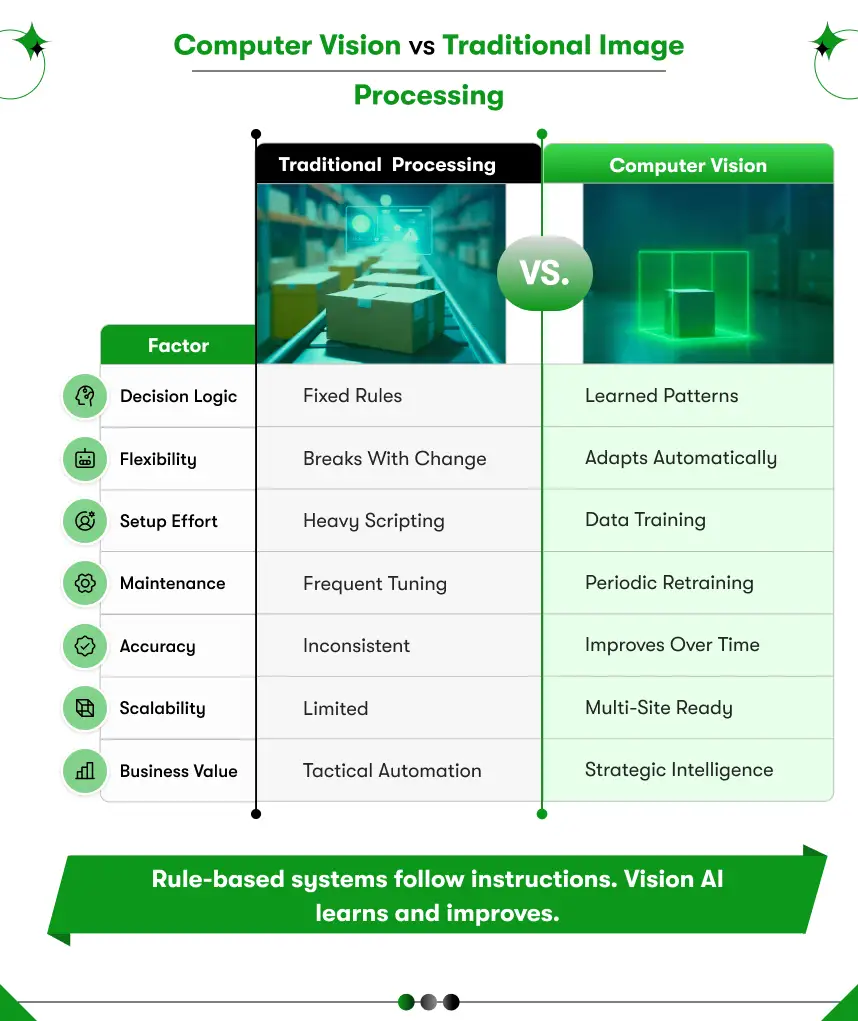
Traditional image processing relies on fixed rules that engineers manually configure for specific conditions, while computer vision uses trained AI models that learn patterns directly from real data and adapt naturally as environments change. Many organizations begin with rule-based scripts because the setup feels simple and predictable, yet those systems often break when lighting varies, products change slightly, or camera angles shift during daily operations. Computer vision handles such variability more effectively because models generalize from examples instead of depending on fragile instructions, which allows performance to remain stable across real-world scenarios.
| Aspect | Traditional Image Processing | Computer Vision |
| Decision method | Predefined rules and thresholds | Learned patterns from datasets |
| Flexibility | Works only in controlled setups | Adapts to changing environments |
| Maintenance effort | Frequent manual tuning | Periodic retraining |
| Scalability | Limited to small deployments | Easily expands across locations |
| Accuracy consistency | Drops with variation | Improves with more data |
| Long-term cost | Hidden support overhead | Better operational efficiency |
| Business value | Tactical automation | Strategic transformation |
Business leaders should view rule-based processing as a short-term solution for narrow and stable tasks, while computer vision offers a stronger foundation for complex operations that demand adaptability and scale. Teams often review real computer vision examples before making the transition because practical results across manufacturing, retail, and logistics provide clearer confidence than theoretical comparisons alone.
The Future of Computer Vision in Business
Computer vision continues to mature from isolated pilots into core operational infrastructure as organizations embed visual intelligence directly into production systems, compliance workflows, and decision engines that run continuously without manual supervision. What once supported selective inspection now influences safety, quality, inventory, and customer experience across entire networks. Companies that invest early often build strong data advantages because trained models, labeled datasets, and integrated processes compound in value over time, making later entry more expensive and slower for competitors.
Edge deployment
- What is changing: Processing moves closer to cameras, using on-site devices instead of remote servers.
- Business impact: Faster decisions, lower latency, and improved reliability for time-critical operations
Vision plus language AI
- What is changing: Visual systems combine image understanding with text and conversational interfaces.
- Business impact: Teams search footage, generate reports, and trigger actions using simple queries
Lower hardware costs
- What is changing: GPUs, smart cameras, and edge devices are becoming more affordable and energy efficient.
- Business impact: Wider deployment across multiple sites without heavy capital investment
Pretrained industry models
- What is changing: Vendors offer ready-to-use models trained for common tasks, such as defects or counting
- Business impact: Faster implementation and shorter time to measurable value
Industry-specific solutions
- What is changing: Platforms arrive with built-in workflows for manufacturing, retail, healthcare, and logistics.
- Business impact: Reduced customization effort and lower project risk
Adoption beyond tech sectors
- What is changing: Traditional industries integrate visual AI into everyday operations
- Business impact: Early adopters gain efficiency advantages that competitors struggle to match
Organizations that treat computer vision as a long-term capability rather than a short-term experiment position themselves for sustained operational gains and stronger competitive control. Many companies build this foundation early with support from experienced partners or a dedicated Computer Vision Software Development Company, ensuring architecture, talent, and processes scale smoothly as adoption grows.
How to Get Started With Computer Vision
Organizations often delay computer vision initiatives because the technology feels complex and risky, yet successful projects usually begin with a focused business problem rather than a large transformation plan. Teams that start small, validate measurable value quickly, and scale gradually across sites consistently achieve stronger outcomes than companies that attempt enterprise-wide rollouts without clear priorities or ownership. A structured approach reduces uncertainty, protects budgets, and ensures the solution connects directly to operational goals instead of remaining an isolated experiment.
Identify the right use case.
- What to focus on: Repetitive visual tasks that consume time, create errors, or slow decisions.
- Business impact: Faster ROI because automation replaces manual effort immediately
Define measurable success metrics.
- What to focus on: Inspection time, defect rate, downtime, labor cost, or throughput improvement
- Business impact: Objective evaluation and easier executive buy-in
Start with a controlled pilot.
- What to focus on: One line, one store, or one warehouse zone with stable conditions
- Business impact: Lower risk and faster learning before scaling investment
Prepare data early
- What to focus on: High-quality images, consistent capture standards, and proper labeling
- Business impact: Higher model accuracy and fewer rework cycles
Plan integration from day one
- What to focus on: Connecting outputs with ERP, MES, CRM, or operational systems
- Business impact: Immediate action instead of passive dashboards
Choose the right technical partner.
- What to focus on: Proven delivery experience, domain knowledge, and production deployment capability
- Business impact: Faster implementation and fewer costly mistakes
Organizations that need a structured starting point often review our Computer Vision Development guide to understand planning steps and common pitfalls before committing resources.
Computer vision delivers measurable value when teams treat it as an operational program with clear ownership, realistic milestones, and tight alignment with business metrics rather than a standalone AI experiment. Companies that follow this phased approach typically move from pilot to production smoothly, scale across locations confidently, and generate consistent returns that justify long-term investment.

Power Your Decision with Computer Vision
Computer vision converts everyday images and video into structured intelligence that helps organizations detect issues faster, reduce manual effort, and make consistent decisions across operations. Companies that understand how computer vision works and implement it with clear goals, strong data preparation, and proper system integration consistently achieve lower costs, higher accuracy, and scalable performance without expanding workforce requirements.
Leaders who want dependable outcomes usually partner with an experienced Computer Vision Software Development Company that can design, build, and deploy solutions aligned with real business metrics rather than experiments. Kody Technolab Limited supports enterprises worldwide with custom AI automation and end-to-end computer vision systems, helping teams move confidently from pilot projects to production-ready results.
FAQ
1. How does computer vision work for businesses in simple terms?
Computer vision captures images or video, processes the data, trains AI models to recognize patterns, and converts detections into automated actions such as alerts or reports that improve speed, accuracy, and operational control.
2. What business problems can computer vision solve?
Computer vision automates repetitive visual tasks such as defect inspection, inventory counting, safety monitoring, and compliance checks, which reduces manual effort, lowers costs, and delivers consistent results across locations.
3. How accurate are computer vision systems in real-world environments?
Accuracy depends on data quality and use case complexity, yet well-trained systems commonly achieve 90 to 98 percent performance. Such consistency often exceeds manual inspection because machines do not tire or miss details.
4. How long does it take to implement a computer vision solution?
A focused pilot usually takes six to twelve weeks, including data collection, labeling, training, and testing. Full deployment timelines depend on integration needs, the number of sites, and system complexity.
5. Do we need new cameras or special hardware to start?
Many projects reuse existing cameras and infrastructure. High-speed or real-time applications may require edge devices or GPUs, yet hardware choices depend on performance targets rather than mandatory upgrades.
6. What is the difference between image processing and computer vision?
Image processing follows fixed rules that struggle with variation, while computer vision learns from examples and adapts to changing conditions, which makes it more reliable and scalable for dynamic business environments.
7. How should we choose the right computer vision partner or vendor?
Look for proven deployment experience, strong integration capability, industry knowledge, and a clear focus on measurable outcomes such as cost savings and efficiency gains rather than only technical demonstrations.








 Contact Information